Documentation Index

Fetch the complete documentation index at: https://docs.vobiz.ai/llms.txt

Use this file to discover all available pages before exploring further.

The SIP Trunking section of the Vobiz Console is where you wire your PBX, AI agent, or VoIP stack to the Vobiz global voice network — outbound termination to any number worldwide, inbound origination to your phone numbers, with per‑trunk recording, transcription, PII redaction, and webhooks.
URL
https://console.vobiz.ai/app/sip
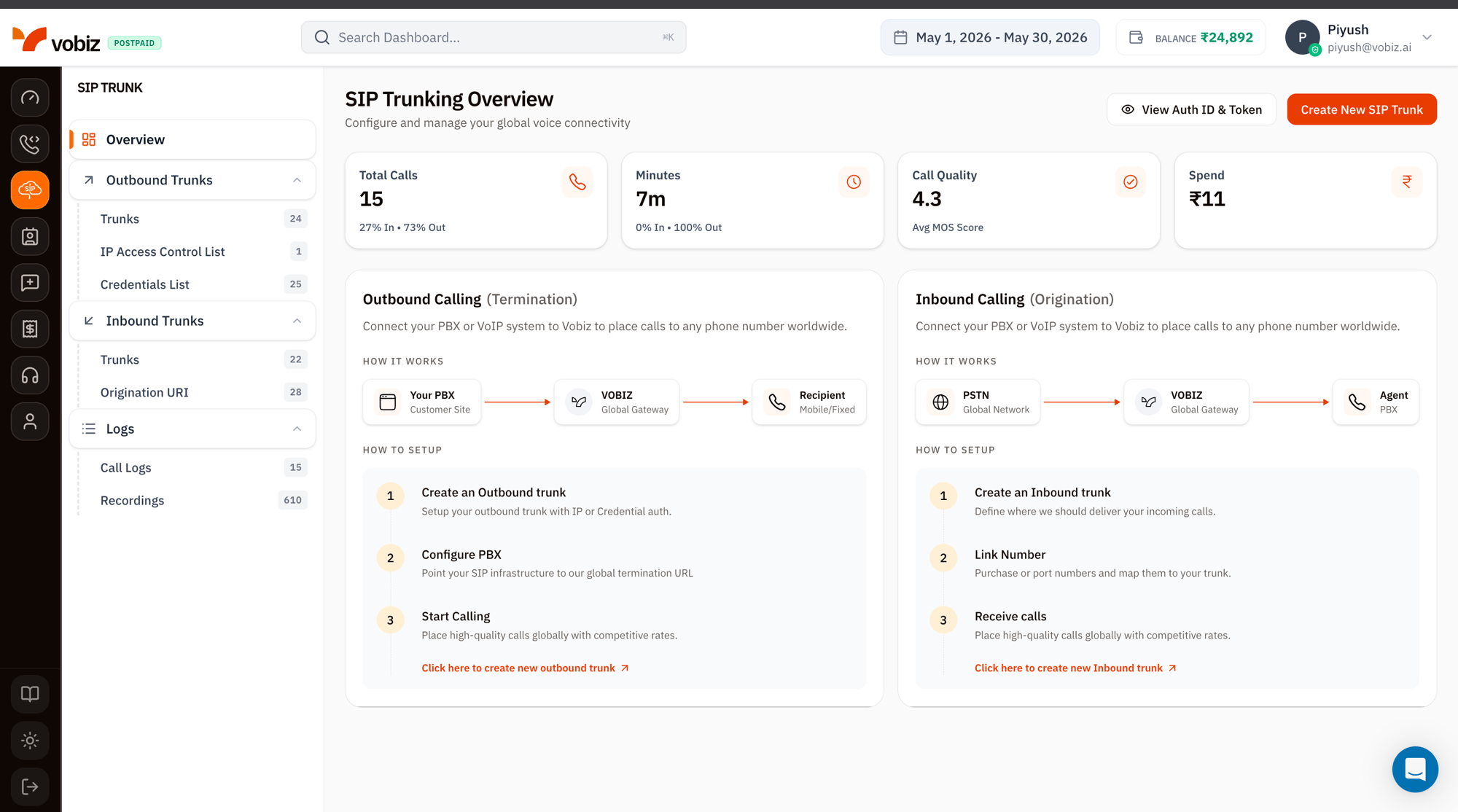
SIP Trunking Overview page with the SIP TRUNK left sidebar (Overview, Outbound Trunks with Trunks 24/IP Access Control List 1/Credentials List 25, Inbound Trunks with Trunks 22/Origination URI 28, Logs with Call Logs 15/Recordings 610), KPI tiles showing Total Calls 15 (27% In, 73% Out), Minutes 7m, Call Quality 4.3 Avg MOS Score, Spend ₹11, and two how-it-works panels for Outbound Calling (Your PBX → VOBIZ → Recipient) and Inbound Calling (PSTN → VOBIZ → Agent)

The SIP Trunking sidebar

The left navigation mirrors the SIP Trunk console exactly. Each item links to its dedicated walkthrough:
GroupPageWhat you do there
OverviewYou’re here — usage tiles and how‑it‑works.
Outbound TrunksTrunksOutbound termination trunks — point your PBX to Vobiz to place calls.
IP Access Control ListWhitelist your PBX’s source IPs for IP‑based auth.
Credentials ListSIP usernames + passwords for credential‑based auth.
Inbound TrunksTrunksOrigination trunks — Vobiz delivers inbound calls to your destination.
Origination URIThe SIP URI Vobiz forwards inbound calls to.
LogsCall LogsPer‑call records with MOS, quality, recording, and AI transcription.
RecordingsStored WAV / MP3 audio for the last 30 days.

Usage tiles

Four KPI tiles summarising SIP‑only traffic for the selected date range:
TileWhat it measures
Total CallsEvery SIP attempt. Split by % In / % Out shows the inbound / outbound mix.
MinutesSum of billable talk time. The % In · % Out line breaks down direction.
Call QualityAverage MOS (Mean Opinion Score) across the period. 4.0+ is good, 3.5–4.0 acceptable.
SpendINR spent on SIP traffic only (excludes Voice API).

Outbound Calling (Termination)

The right‑side “How it works” panel walks the path Your PBX → Vobiz Global Gateway → Recipient (mobile / fixed line).
StepWhat to do
1. Create an Outbound trunkSet up the trunk with IP or Credential auth. See Outbound Trunks.
2. Configure PBXPoint your SIP infrastructure at the trunk’s SIP Domain (e.g. <trunk-id>.sip.vobiz.ai).
3. Start CallingPlace calls to any number worldwide at Vobiz rates.
Click Create New SIP Trunk in the top‑right of the overview, or Click here to create new outbound trunk at the bottom of the Outbound panel.

Inbound Calling (Origination)

The left‑side panel walks the path PSTN Global Network → Vobiz Global Gateway → your Agent / PBX / soft‑switch.
StepWhat to do
1. Create an Inbound trunkDefine where Vobiz should deliver your incoming calls. See Inbound Trunks.
2. Link NumberPurchase or port phone numbers and map them to the trunk.
3. Receive callsVobiz forwards inbound calls to your Origination URI.

View Auth ID & Token

The View Auth ID & Token button (top‑right) reveals your API credentials in a modal — same values as the main Dashboard, surfaced here for convenience when scripting SIP trunk provisioning via the Trunks API.
The Auth Token grants full API access. Treat it like a password — never paste it into client‑side code or public repos.

What’s next

Create an Outbound Trunk

Connect your PBX to place calls worldwide.

Create an Inbound Trunk

Receive PSTN calls to your numbers.