

URL
The Outbound Trunks list
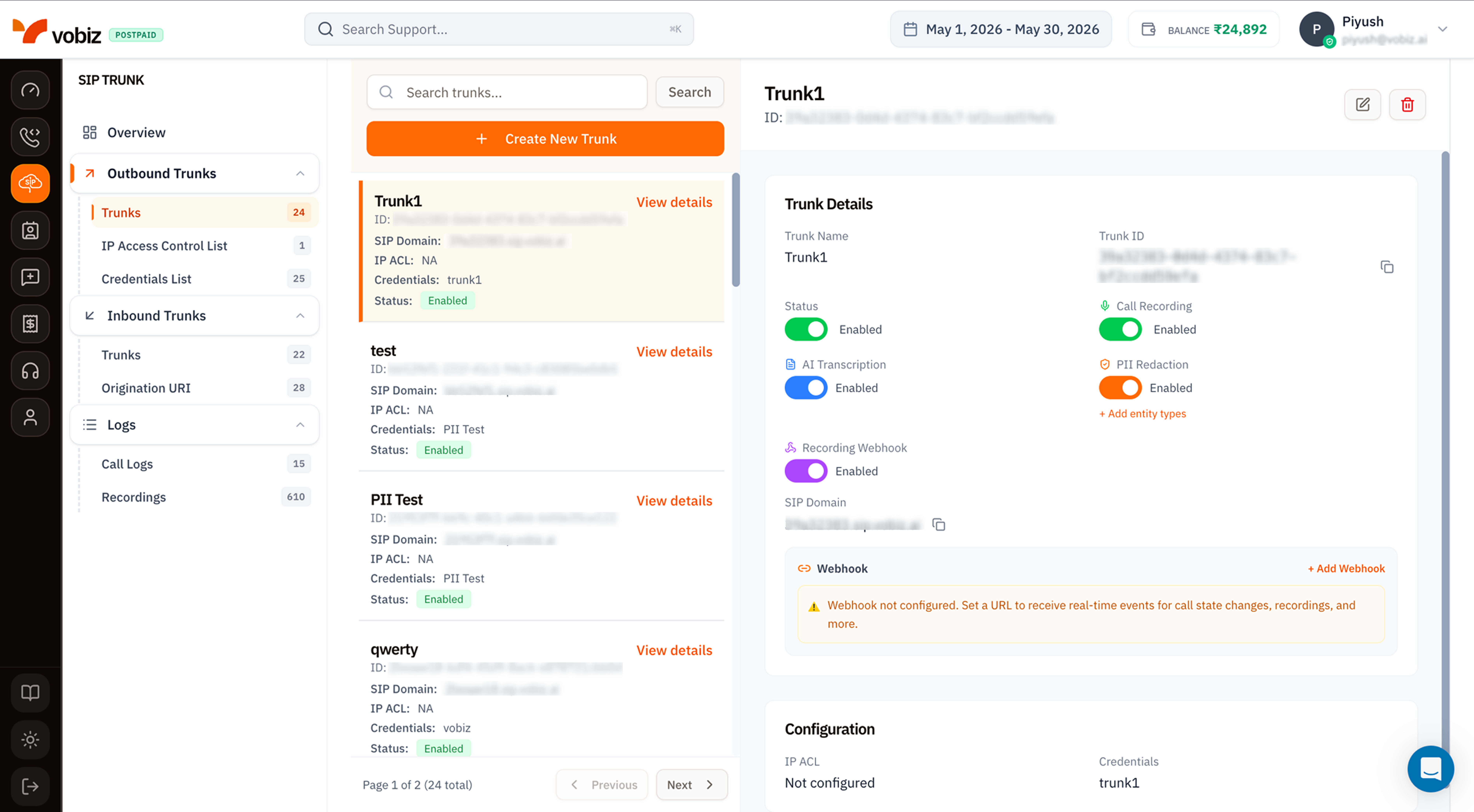
- Search + Create -
Search trunks…filter and a + Create New Trunk button. - Trunk list - each card shows the trunk name, ID, SIP Domain, IP ACL status, attached Credentials, and current Status badge (
Enabled/Disabled). - Trunk Details panel - the right side updates when you click a card.
The trunk details panel
| Field | Meaning |
|---|---|
| Trunk Name | Friendly label. Edit any time via the pencil icon. |
| Trunk ID | Immutable UUID. Use this as trunk_id in REST API calls. |
| Status | Toggle to enable/disable the trunk without deleting it. A disabled trunk rejects all SIP traffic instantly. |
| SIP Domain | The hostname your PBX points its INVITEs at (e.g. 39a32383.sip.vobiz.ai). One per trunk - never shared. |
Recording & Transcription toggles
Four togglable features, all per‑trunk:| Feature | What it does |
|---|---|
| Call Recording | Records every call on this trunk to WAV (default) or MP3. Retention is 30 days; export historical recordings via the Recording API for longer storage. |
| AI Transcription | Generates speaker‑labelled transcripts plus sentiment scoring. Requires Call Recording. |
| PII Redaction | Masks names, phone numbers, emails, and other PII in both audio and transcripts. Requires AI Transcription. Use + Add entity types to extend the redaction list. |
| Recording Webhook | POSTs a notification to a URL when each recording is ready for download. Useful for hooking recordings straight into your storage pipeline. |
Configuration
The bottom card surfaces the auth wiring at a glance:- IP ACL - name of the IP Access Control List attached (or
Not configured). See IP Access Control List. - Credentials - name of the credential list attached (or
Not configured). See Credentials List.
Webhook
A general‑purpose webhook URL Vobiz POSTs call state events to (started, answered, ended). Click + Add Webhook to configure - same payload shape as the trunk webhook reference.Create an Outbound Trunk
Click + Create New Trunk to open the side panel.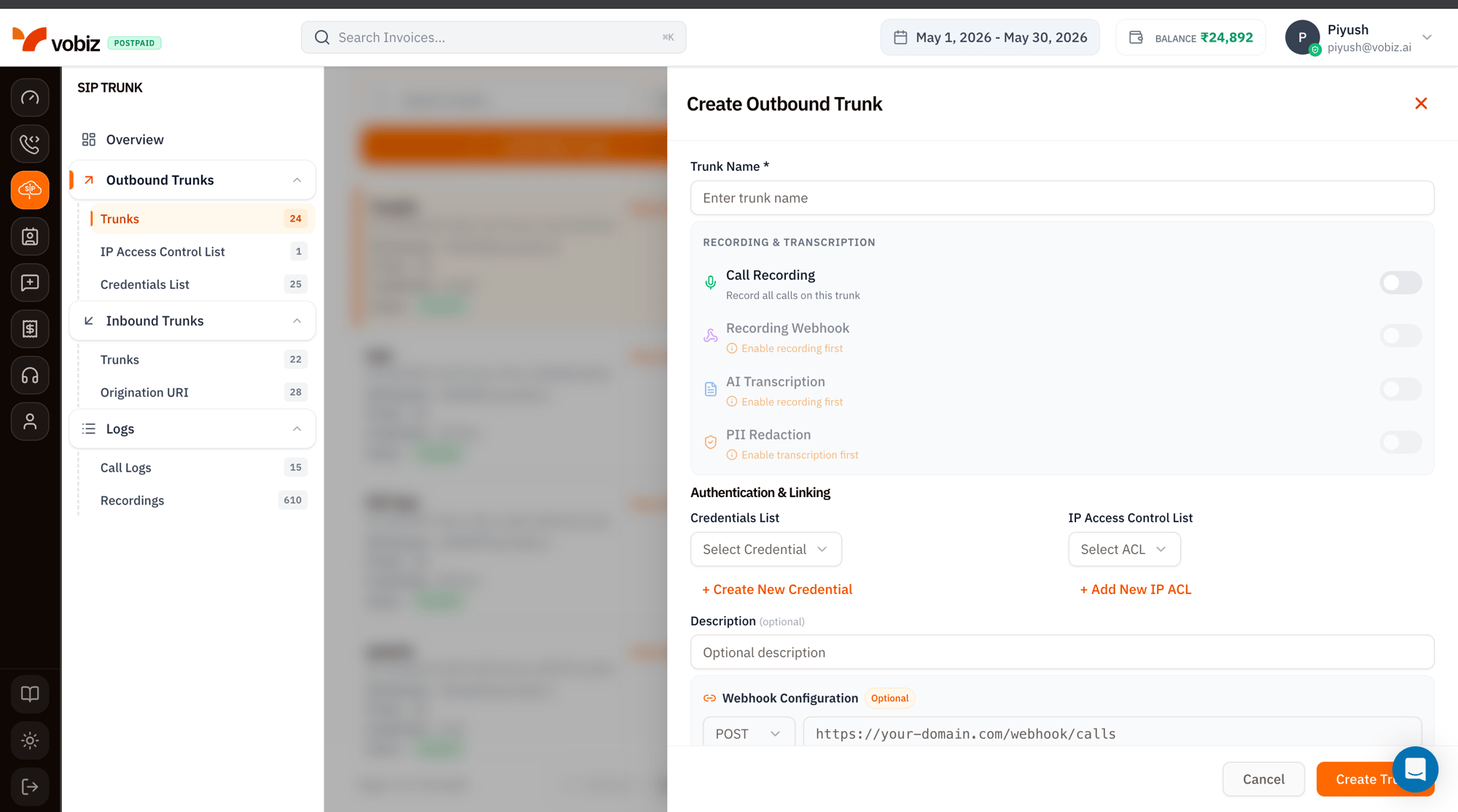
| Section | Field | Notes |
|---|---|---|
| Trunk Name | Required | A friendly label. |
| Recording & Transcription | Call Recording | Master switch. Other recording toggles are greyed until this is on. |
| Recording Webhook | Notification on each new recording. | |
| AI Transcription | Auto‑transcribe + sentiment. Requires recording. | |
| PII Redaction | Mask PII in audio and transcripts. Requires transcription. | |
| Authentication & Linking | Credentials List | Pick an existing credential set, or click + Create New Credential to make one inline. |
| IP Access Control List | Pick an existing ACL, or click + Add New IP ACL to whitelist your PBX IPs. | |
| Description (optional) | – | Notes for your own team. |
| Webhook Configuration (optional) | POST URL | Receive real‑time call events for state changes. |
Pointing your PBX
Once the trunk is created:Edit, disable, delete
Top‑right of the details panel:- ✏ Edit - opens the form for changing any field except the Trunk ID.
- Status toggle - disable without deleting; calls are rejected instantly.
- 🗑 Delete - permanently removes the trunk. Active calls drop.
Tips
- One trunk per environment. Keep prod, staging, and dev on separate trunks so a misconfigured stage trunk can’t bleed into prod metrics.
- Recording + transcription has a billing impact. It’s worth it for AI agent flows, but expensive at carrier‑grade volumes - see the Cost Calculator.
- Webhook over polling. The trunk webhook is the cheapest way to know when a recording is ready - beats polling
GET /recordings.
What’s next
IP Access Control List
Whitelist your PBX’s source IPs.
Credentials List
Set up SIP usernames and passwords.