

URL
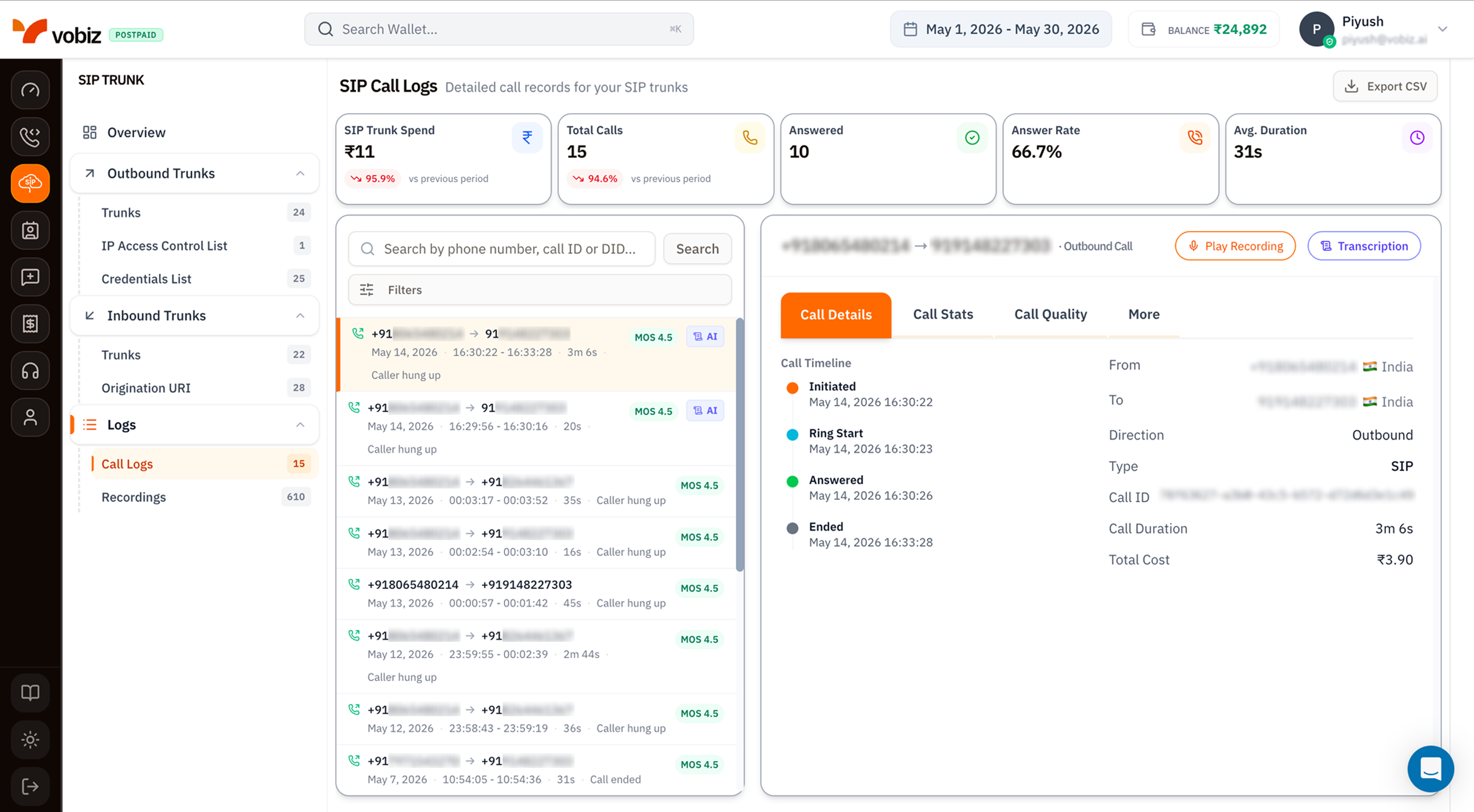
| Element | SIP Call Logs | Voice Call Logs |
|---|---|---|
| Scope | SIP trunk traffic only (inbound + outbound). | Voice API + XML applications. |
| KPI tiles | SIP Trunk Spend, Total Calls, Answered, Answer Rate, Avg. Duration. | Voice API Spend, Total Calls, Answered, Answer Rate, Avg. Duration. |
| Type column | Shows SIP for every row. | Shows Voice Application, API, or SIP. |
| Recording button | Play Recording (top‑right of details) when the trunk has Call Recording enabled. | Same button when an XML app recorded the call. |
| Transcription button | Transcription (top‑right of details) when AI Transcription is enabled. | Same button. |
KPI tiles
| Tile | What it measures |
|---|---|
| SIP Trunk Spend | INR spent on SIP traffic for the selected date range. |
| Total Calls | Every SIP attempt. |
| Answered | The subset that connected. |
| Answer Rate | Answered / Total Calls. |
| Avg. Duration | Mean talk time across answered calls. |
Call details panel
Same 4‑tab layout as Voice Call Logs - Call Details, Call Stats, Call Quality, More. For SIP traffic specifically, the More tab adds:- SIP Trace - raw INVITE / 100 / 180 / 200 / BYE messages with timing.
- Hangup Cause Code - the SIP cause code (
486 Busy Here,487 Request Terminated, etc.) plus the friendly label. - Auth Method -
IP ACLorCredentials, useful for confirming which auth path the call used.
Filters
Same modal as Voice Call Logs filters:- Direction (All / Inbound / Outbound)
- From Number / To Number (substring)
- Min / Max Duration (seconds)
- Hangup Cause (dropdown)
Export to CSV
The Export CSV button downloads every call in the current filter + date range as a CSV - same columns as Voice Call Logs, plus aTrunk Name and Auth Method column for SIP rows.
Tips
- Filter by Trunk when triaging a specific PBX. Use search box with the trunk’s name.
- MOS < 3.5 consistently on outbound suggests a network problem between your PBX and Vobiz - check Call Stats for packet loss and jitter.
- Hangup Cause 486 Busy Here in inbound logs means your PBX’s lines are full - increase concurrency or load‑balance across trunks.
What’s next
Recordings
Play and download audio for recorded SIP calls.
CDR API
Pull the same data programmatically.