

URL
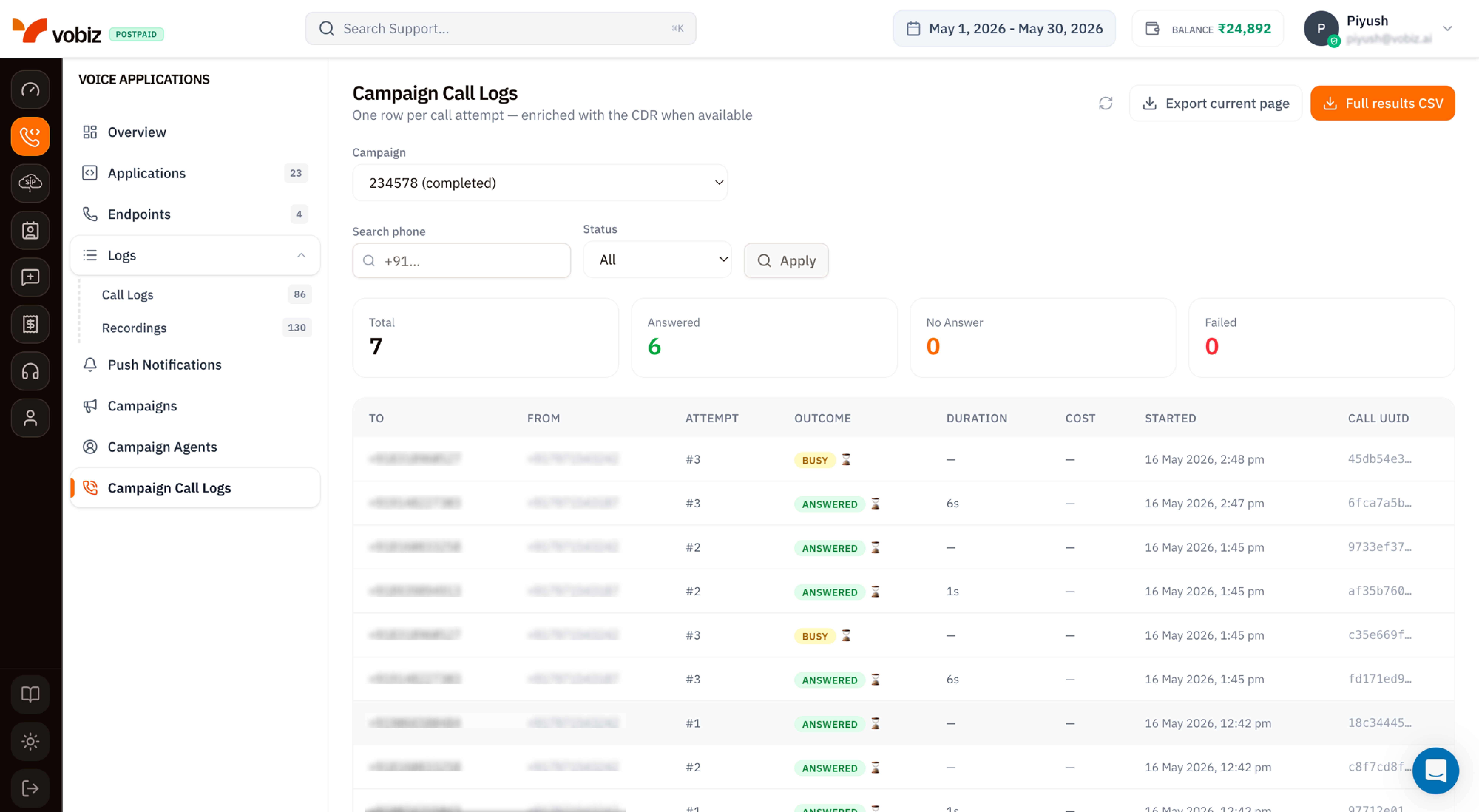
One row per call attempt - enriched with the CDR when available.A contact retried twice produces three rows: the original (
#1) plus the two retries (#2, #3). The CDR - duration, cost, call quality - is stitched in once the attempt finishes; “in flight” rows show — for those fields until the call ends.
Filters
Three controls sit above the KPI tiles. All three apply together; click Apply to refresh the table.| Filter | Type | Use it for |
|---|---|---|
| Campaign | Dropdown | Pick one campaign by ID and status (e.g. 234578 (completed)). Required - the table only ever shows rows for one campaign at a time. |
| Search phone | Substring | Match against to or from numbers. Useful for finding “did we ever call this lead?” |
| Status | Dropdown | All, Answered, Busy, No Answer, Failed, In progress. |
KPI tiles
Four counters reflecting the current campaign + filter set.| Tile | What it counts |
|---|---|
| Total | Every attempt visible under the active filters. |
| Answered (green) | The subset that connected - callee picked up. |
| No Answer (orange) | Rang out without being picked up. |
| Failed (red) | Network errors, rejected by the carrier, or invalid number. |
Busy attempts aren’t a top‑line tile - they show in the table’s Outcome column. Use the Status = Busy filter if you need a count.
Table columns
| Column | Meaning |
|---|---|
| TO | Destination number from the Contacts CSV. |
| FROM | Caller ID used for this specific attempt - picked from your pool via the configured rotation strategy. |
| ATTEMPT | #1 for the original, #2+ for retries. Tied to the campaign’s Retry Attempts setting. |
| OUTCOME | Badge: ANSWERED, BUSY, NO ANSWER, FAILED, IN PROGRESS. The ⏳ hourglass icon means the row is still being enriched with CDR data. |
| DURATION | Talk time. — for unanswered attempts. |
| COST | INR billed for the attempt. — until the CDR lands. |
| STARTED | Timestamp the dial fired, in your browser timezone. |
| CALL UUID | Canonical Vobiz Call ID - quote this in support tickets and use it to cross‑reference Voice Call Logs. |
Export
Two buttons in the top‑right:| Button | What you get |
|---|---|
| Export current page | CSV of just the rows visible on the current page (default 20 rows). Fast - fires immediately. |
| Full results CSV | CSV of every row matching the current campaign + filters across all pages. Queued server‑side; large campaigns can take a few seconds. |
Call UUID is the full UUID (not truncated), Hangup Cause is added, and a Recording URL column appears for attempts that produced audio.
Tips
- Filter by Status = Failed first when a campaign underperforms. Failed attempts cluster - fix the systemic cause (invalid number format, blocked country, expired trunk credential) before retrying.
- Cross‑reference Attempt #. A contact that retried 3× and never connected is a dead lead - drop them from the next campaign upload.
- Quote the Call UUID, never the row number or campaign name, when filing a Vobiz support ticket.
- In‑progress rows refresh on Apply. Hitting Apply with the same filters is the easiest way to re‑poll without leaving the page.
What’s next
Campaigns
Pause underperforming campaigns or launch new ones.
Voice Call Logs
The same call viewed alongside non‑campaign traffic.