

URL
The Inbound Trunks list
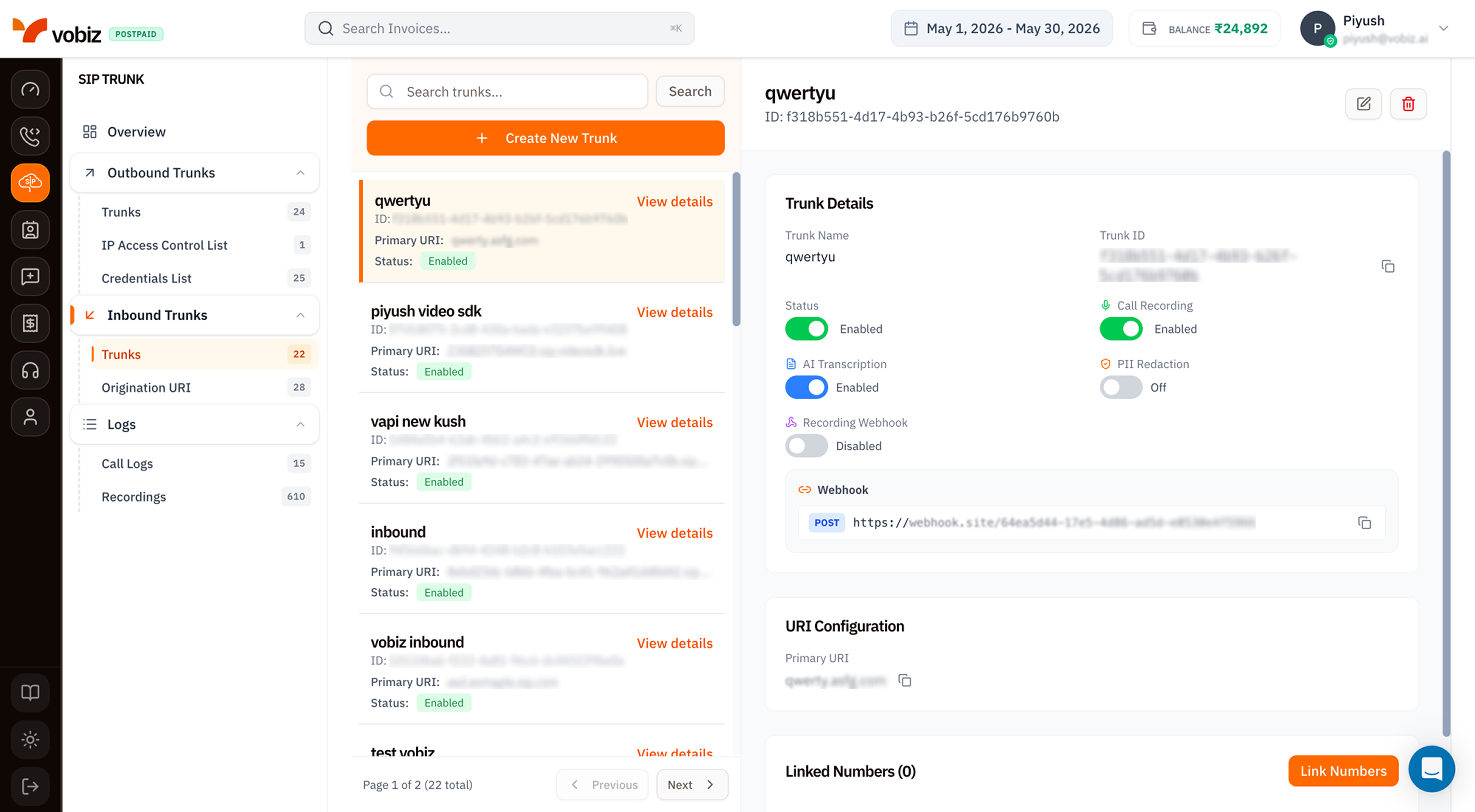
The trunk details panel
| Field | Meaning |
|---|---|
| Trunk Name | Friendly label. |
| Trunk ID | Immutable UUID - quote in support tickets. |
| Status | Toggle to enable/disable. A disabled trunk doesn’t receive inbound calls - Vobiz returns a SIP error to the carrier. |
| Primary URI | The SIP URI Vobiz forwards inbound calls to (e.g. qwerty.asfg.com). One Origination URI per trunk. |
Recording & Transcription toggles
Identical to outbound trunks: Call Recording, AI Transcription, PII Redaction, Recording Webhook. Each obeys the same prerequisite chain - transcription needs recording, redaction needs transcription.Webhook
A general‑purpose webhook URL Vobiz POSTs inbound‑call events to (incoming.ringing, incoming.answered, incoming.ended). Use it to track who’s calling, drive a live CRM update, or log to your data warehouse.
URI Configuration
| Field | Meaning |
|---|---|
| Primary URI | The SIP destination. Vobiz forwards inbound INVITEs to this URI. Manage the list of available URIs from Origination URI. |
Linked Numbers
Below the URI Configuration card, the Linked Numbers (N) section lists every DID currently routing to this trunk. Click Link Numbers in the top‑right of the section to attach more numbers or detach existing ones.Create an Inbound Trunk
Click + Create New Trunk to open the side panel.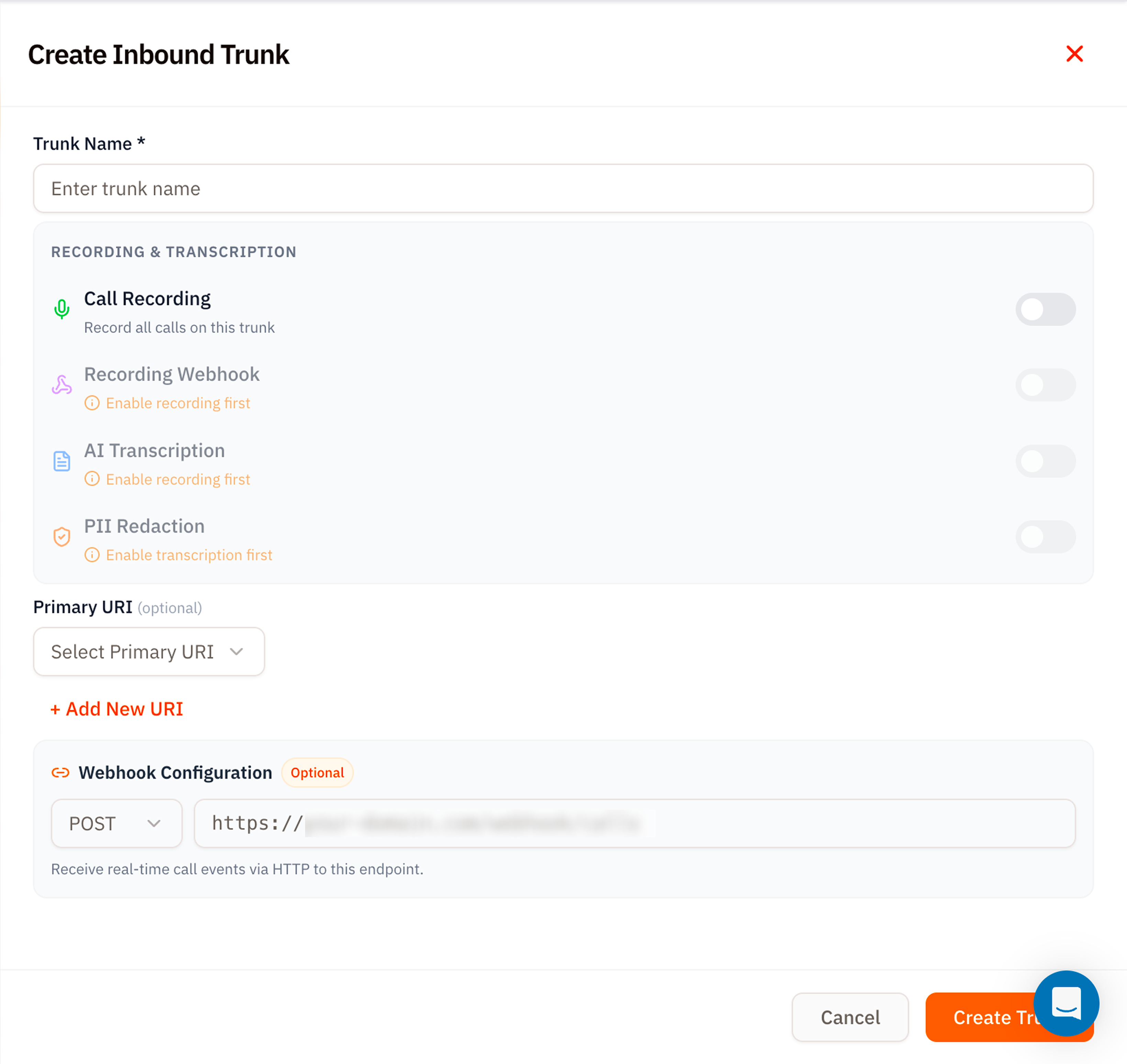
| Section | Field | Notes |
|---|---|---|
| Trunk Name | Required | A friendly label. |
| Recording & Transcription | Same four toggles as the trunk details panel. | – |
| Primary URI (optional) | Select Primary URI | Pick from existing Origination URIs, or click + Add New URI to create one inline. |
| Webhook Configuration (Optional) | POST URL | Receive inbound call state events. |
Linking numbers
After the trunk exists:- Open the trunk details.
- Scroll to Linked Numbers and click Link Numbers.
- Pick existing numbers from your account or buy new ones inline - same flow as the Voice Applications attach‑number modal.
Tips
- Use Origination URIs as named destinations. Even if you only have one PBX, give the URI a name like
primary-pbx-mumbai- it’s clearer than a raw1.2.3.4:5060. - Webhook before recording. If you only want call state for analytics, the webhook is enough - no need to enable recording.
- Status toggle for maintenance windows. Disable the trunk to fail‑fast on inbound (carrier returns “all circuits busy”) instead of timing out on a dead PBX.
What’s next
Origination URI
Add or edit the SIP destinations Vobiz forwards to.
Phone Numbers
Buy or port the DIDs that ring this trunk.