

URL
The Recordings page
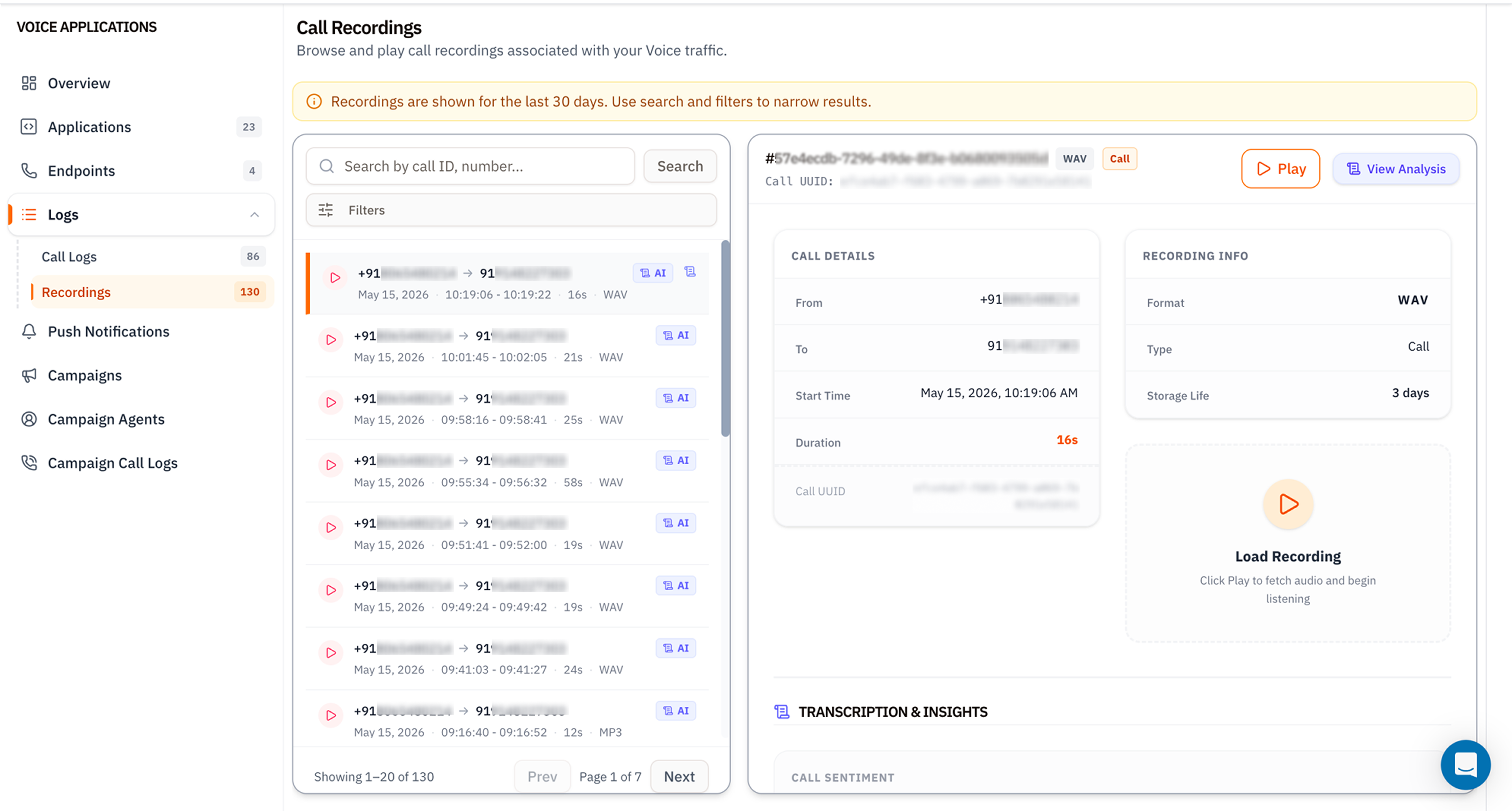
The recordings list
The left column shows up to 20 recordings per page. Each row has:- ▶ Play icon - click to load and play inline.
- From → To numbers.
- Date and timestamps (
HH:MM:SS - HH:MM:SS) plus duration. - Format badge -
WAV(uncompressed PCM) orMP3(lossy, smaller). - AI badge - indicates the recording has been transcribed and analysed.
Recording details panel
The right side shows everything Vobiz knows about the selected recording.Top bar
- Recording ID (e.g.
#57e4ecdb-7296-49de-8f3e-b0680093505d). - Format badge (
WAV/MP3). - Type badge (
Call,Conference,Stream). - ▶ Play - fetches the audio and starts playback.
- View Analysis - opens the full AI breakdown (transcript, sentiment, keywords).
Call Details card
| Field | Meaning |
|---|---|
| From | Caller number with country flag. |
| To | Destination number. |
| Start Time | UTC timestamp converted to your browser timezone. |
| Duration | Total recorded length. |
| Call UUID | Canonical Call ID - matches what you see in Call Logs. |
Recording Info card
| Field | Meaning |
|---|---|
| Format | WAV (8 kHz mono PCM by default) or MP3 (CBR 64 kbps). |
| Type | Call for standard recordings, Conference for conference legs. |
| Storage Life | Days remaining before automatic deletion. The clock starts at recording creation. |
Load Recording card
The ▶ Load Recording card is the inline player. Click play, the audio fetches lazily (recordings aren’t pre‑loaded to save bandwidth), and you get standard playback controls. Right‑click → Save audio as… to download a local copy.Transcription & Insights
Below the player, two AI‑generated sections appear once analysis completes (usually a few minutes after the call ends):- Transcription - the full text with speaker labels.
- Call Sentiment - per‑speaker sentiment scoring (positive / neutral / negative) plus highlighted moments.
Filters
Same modal as Call Logs filters - direction, From/To numbers, min/max duration, hangup cause.Tips
- Export critical recordings within 30 days. The retention window is hard - there’s no recovery after deletion.
- MP3 saves bandwidth. For long compliance retention, MP3 is ~10× smaller than WAV with negligible quality loss for voice.
- Quote the Call UUID in support tickets, not the recording ID - it ties back to the full CDR and SIP trace.
What’s next
Recording API
Programmatic access - list, download, delete, bulk export.
Export historical
Bulk‑export recordings to long‑term storage before retention kicks in.