

URL
The model
A campaign is built from three resources that live side‑by‑side in the Voice Applications sidebar:Campaign Agents
Reusable answer/hangup webhook configs. Created once, used by many campaigns.
Campaigns
The actual outbound runs - agent + numbers + contacts + pacing.
Campaign Call Logs
Per‑attempt history for every campaign.
Create a new campaign
Click + New Campaign to open the side panel. The form is long; this page walks every field in order.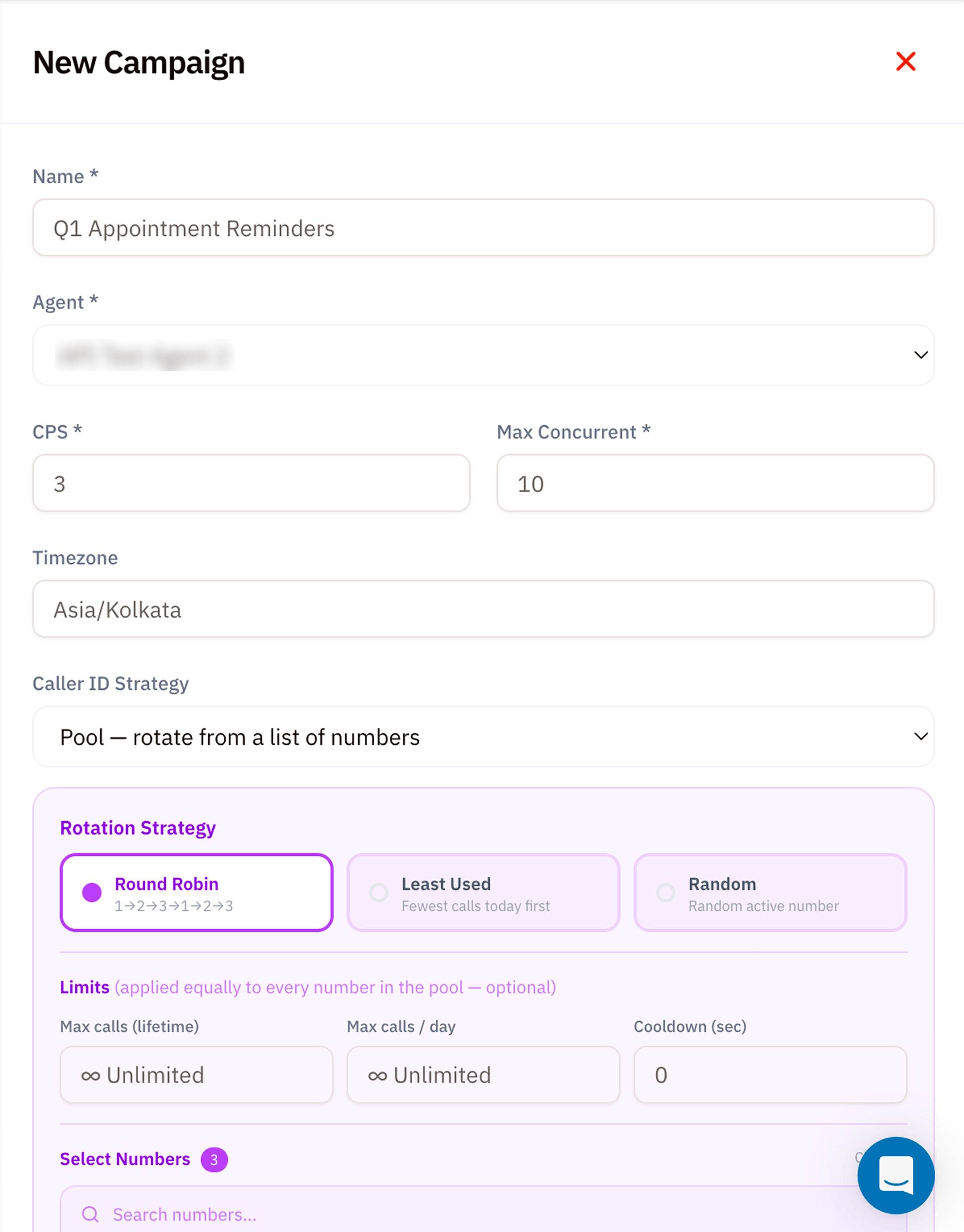
1. Basic info
| Field | Required | Notes |
|---|---|---|
| Name | ✅ | A label like “Q1 Appointment Reminders” - shown everywhere this campaign appears. |
| Agent | ✅ | Dropdown of every Campaign Agent on your account. The Agent decides Answer URL, Hangup URL, and static SIP headers. |
2. Pacing
| Field | Required | Notes |
|---|---|---|
| CPS (Calls Per Second) | ✅ | Peak dial rate. Vobiz queues attempts and releases them at this rate. Stay at or below your account’s CPS capacity. |
| Max Concurrent | ✅ | Cap on simultaneously active campaign calls. Use the CPS Calculator to size this against your expected call duration. |
| Timezone | – | Used by Daily calling window. Defaults to your account timezone (e.g. Asia/Kolkata). |
3. Caller ID Strategy
Decide which of your phone numbers should appear as the caller ID on each attempt.| Strategy | When to use |
|---|---|
| Pool - rotate from a list of numbers | Default. Spreads calls across multiple numbers to avoid carriers flagging a single number as a spam source. |
| Single - use one number | All calls show the same caller ID. Useful for branded outbound from one published business number. |
| Sticky - same number per contact | The same destination always sees the same caller ID across retries - better answer rates because the recipient learns to recognise it. |
4. Rotation Strategy (only shown for Pool)
| Strategy | How Vobiz picks the next number |
|---|---|
| Round Robin | Strict sequence 1 → 2 → 3 → 1 → 2 → 3 …. Predictable, evenly distributes load. |
| Least Used | Picks the number with the fewest calls today first. Self‑balancing under uneven contact lists. |
| Random | Picks any active number at random. Best when carriers fingerprint Round Robin patterns. |
5. Limits (optional, applied to every number in the pool)
| Field | Notes |
|---|---|
| Max calls (lifetime) | Stop using a number once it’s placed this many calls total. Unlimited by default. |
| Max calls / day | Daily ceiling per number. Resets at midnight in the campaign’s timezone. |
| Cooldown (sec) | Minimum gap between two calls from the same number - useful when carriers throttle rapid repeats. |
6. Select numbers + Contacts CSV
Scroll down for the second half of the form.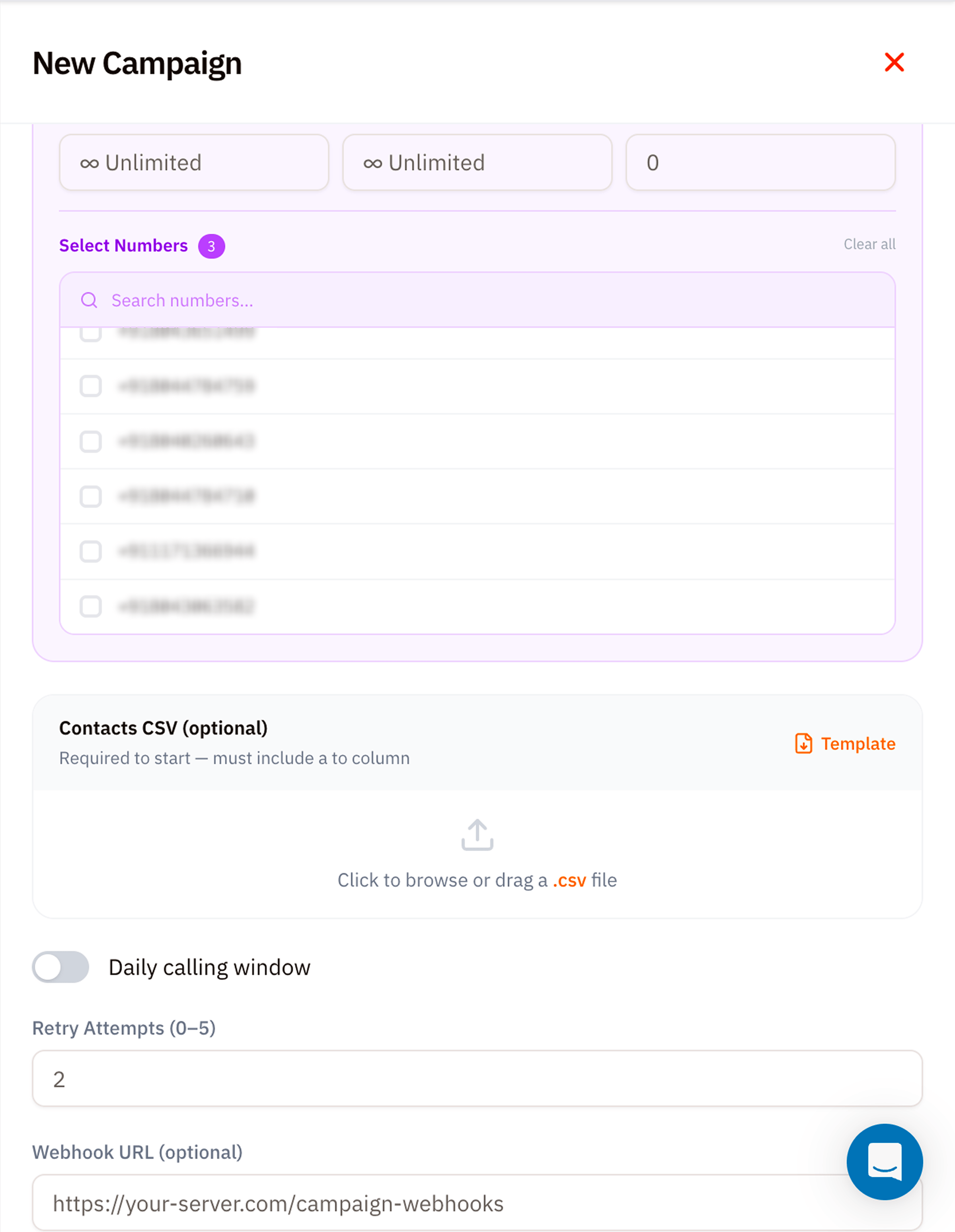
Select Numbers
Tick the caller‑ID numbers Vobiz should rotate through. The badge next to Select Numbers counts your current selection. Use the search to filter long lists.Contacts CSV (required to start)
Upload a.csv file with at minimum a to column. Click Template to download a starter file with the expected schema:
Phone numbers must be in E.164 format (
+<country><number>). Vobiz rejects rows without a leading +.7. Daily calling window (optional)
Toggle on to restrict outbound dialling to specific hours in the campaign’s timezone - e.g. 9am–7pm Mon–Sat for India compliance. Attempts queue outside the window and fire at the next allowed slot.8. Retry Attempts
How many times to retry a contact that didn’t answer (busy, no‑answer, network error). Range0–5. Default 2. Vobiz uses an exponential‑backoff retry schedule.
9. Webhook URL (optional)
A campaign‑level webhook Vobiz POSTs to on every state change -campaign.started, attempt.placed, attempt.completed, campaign.finished. Use it to live‑update your dashboard or push outcomes into your CRM.
Example webhook URL
Launch and monitor
Click Create Campaign at the bottom of the form. Vobiz validates the CSV, queues every row, and starts dialling at the next allowed slot. Watch progress from two places:- The Campaigns list itself - each row shows
attempted / total, status, and ETA. - Campaign Call Logs - per‑attempt detail with hangup cause and (if recorded) audio.
Pause, resume, abort
Each campaign card has three controls:- ⏸ Pause - stop placing new attempts. Calls already in flight finish normally.
- ▶ Resume - restart from where the pause left off.
- ⏹ Abort - cancel remaining attempts permanently. Completed attempts stay in the logs.
Tips
- Always pilot. Run a 100‑row CSV first to confirm Agent Answer URLs, caller‑ID rotation, and CRM webhook handling. Then scale.
- Stay under your CPS cap. A campaign exceeding the account cap will throttle silently - attempts queue but don’t dial.
- Use Sticky caller ID for retries. Recipients answer familiar numbers much more often.
- Compliance windows matter. In India, outbound calling outside 9am–9pm risks DLT complaints - set the daily window or set retry attempts conservatively.
What’s next
Campaign Call Logs
Watch every attempt as it runs.
CPS Calculator
Size CPS, concurrency, and daily volume before launching.