

URL
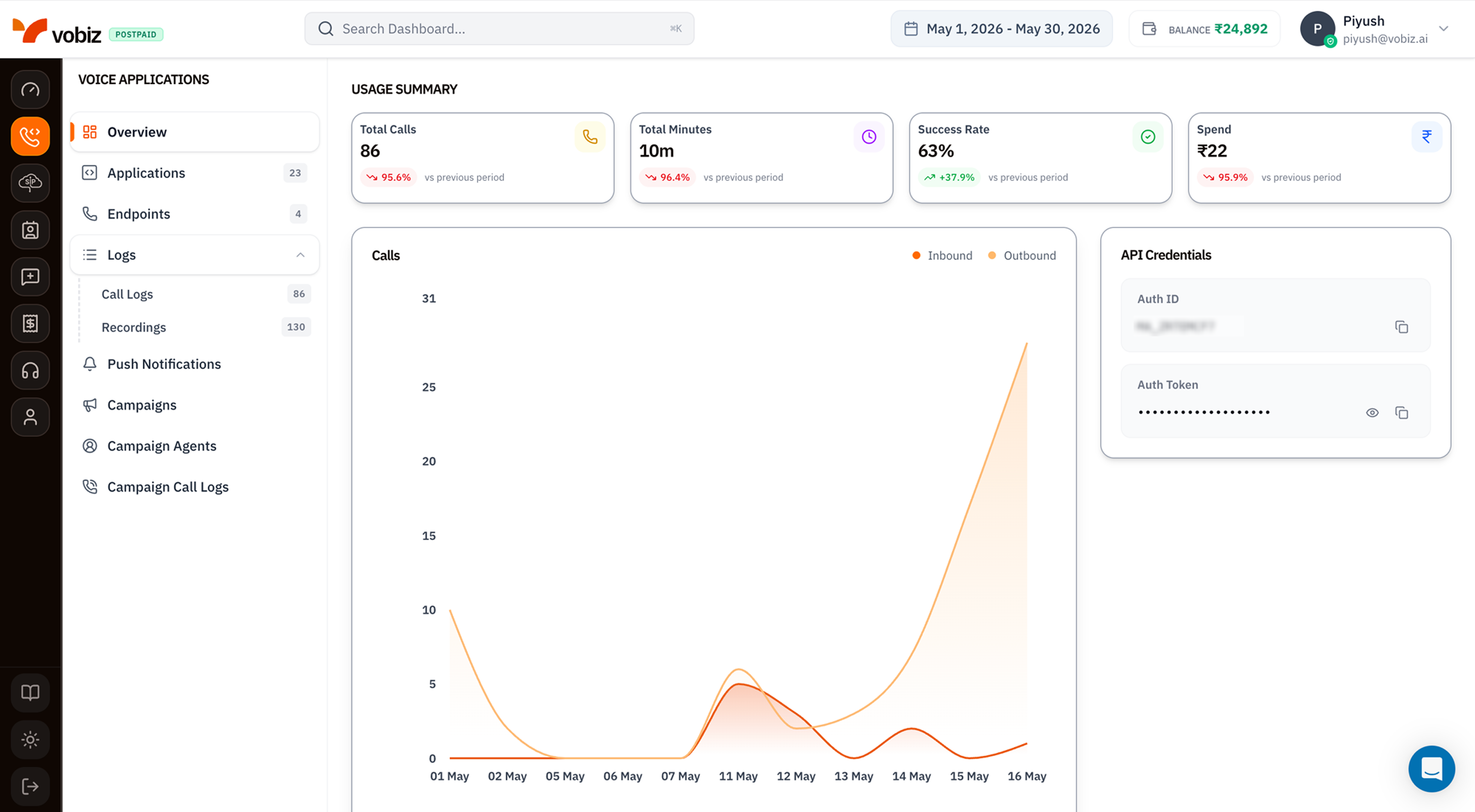
Left navigation - Voice Applications
The sidebar lists every page in this section. Each one has a dedicated walkthrough:| Entry | What you do there |
|---|---|
| Overview | You’re here - usage tiles and call activity chart. |
| Applications (count) | Create and manage XML applications with answer/hangup webhooks. |
| Endpoints (count) | Register SIP endpoints for softphones, Zoiper, and the WebRTC demo. |
| Logs → Call Logs (count) | Per‑call records with timeline, MOS score, and audio quality. |
| Logs → Recordings (count) | Stored WAV / MP3 files for the last 30 days plus AI transcripts. |
| Push Notifications | Push tokens used to wake mobile softphones for incoming calls. |
| Campaigns | Bulk outbound dialler - Agent + numbers + CSV. |
| Campaign Agents | Reusable webhook configs shared across campaigns. |
| Campaign Call Logs | Per‑attempt history for every campaign. |
Usage Summary tiles
Four KPI tiles summarising voice activity in the selected date range:| Tile | What it measures |
|---|---|
| Total Calls | Every voice attempt placed via REST API, XML apps, or campaigns. |
| Total Minutes | Sum of billable talk time (rounded per Vobiz’s pulse‑billing rules). |
| Success Rate | answered / total - the percentage of attempts that connected. |
| Spend | Voice‑only INR spend for the period (excludes number rental and feature costs - those live on the main Dashboard). |
Calls - inbound vs outbound chart
A daily area chart with two series:- Inbound (red) - calls received on your Vobiz phone numbers.
- Outbound (orange) - calls placed via API, XML, or campaigns.
API Credentials
The right‑side card duplicates your Auth ID and Auth Token from the main Dashboard so you can copy them without leaving the Voice section. Click the eye icon (👁) to reveal the token, the copy icon (⧉) to copy.What’s next
Create an XML Application
Wire a phone number to your server’s answer/hangup webhooks.
Register a SIP Endpoint
Sign in from a softphone like Zoiper or the WebRTC demo.