> ## Documentation Index
> Fetch the complete documentation index at: https://docs.vobiz.ai/llms.txt
> Use this file to discover all available pages before exploring further.
# Voice Applications - Overview
> The Voice Applications hub in the Vobiz Console - usage summary, call analytics, API credentials, and quick links to every voice resource (apps, endpoints, logs, recordings, push notifications, campaigns).
The **Voice Applications** section of the Vobiz Console is the home base for every voice‑related resource on your account - XML applications, SIP endpoints, call logs, recordings, push notifications, and outbound campaigns. The Overview page is the at‑a‑glance summary.
```text URL theme={null}
https://console.vobiz.ai/app/voice/overview
```
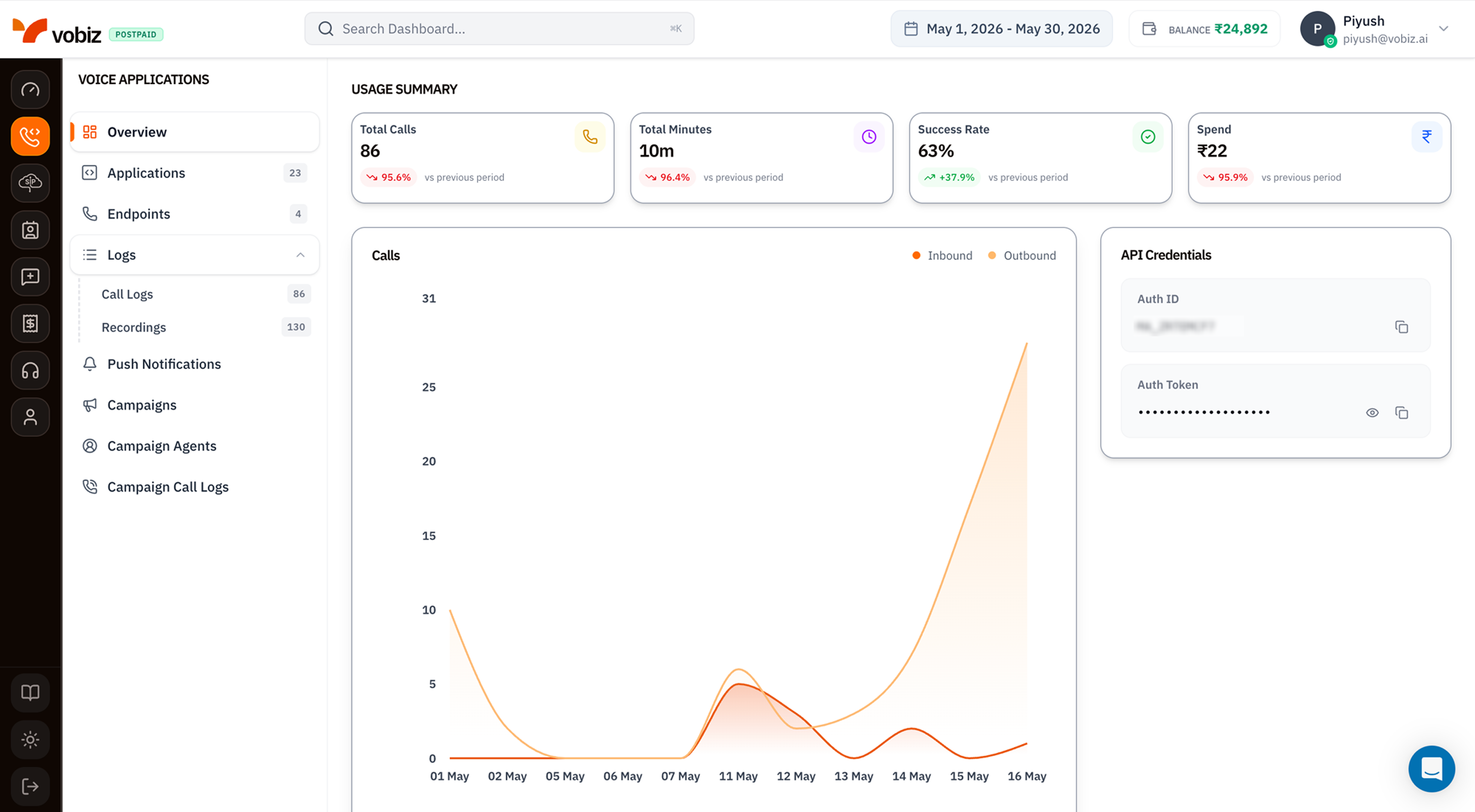 ## Left navigation - Voice Applications
The sidebar lists every page in this section. Each one has a dedicated walkthrough:
| Entry | What you do there |
| ----------------------------------------------------------- | ------------------------------------------------------------------- |
| **[Overview](/platform/voice/overview)** | You're here - usage tiles and call activity chart. |
| **[Applications](/platform/voice/applications)** (count) | Create and manage XML applications with answer/hangup webhooks. |
| **[Endpoints](/platform/voice/endpoints)** (count) | Register SIP endpoints for softphones, Zoiper, and the WebRTC demo. |
| **Logs → [Call Logs](/platform/voice/call-logs)** (count) | Per‑call records with timeline, MOS score, and audio quality. |
| **Logs → [Recordings](/platform/voice/recordings)** (count) | Stored WAV / MP3 files for the last 30 days plus AI transcripts. |
| **Push Notifications** | Push tokens used to wake mobile softphones for incoming calls. |
| **[Campaigns](/platform/campaigns/list)** | Bulk outbound dialler - Agent + numbers + CSV. |
| **[Campaign Agents](/platform/campaigns/agents)** | Reusable webhook configs shared across campaigns. |
| **[Campaign Call Logs](/platform/campaigns/call-logs)** | Per‑attempt history for every campaign. |
## Usage Summary tiles
Four KPI tiles summarising voice activity in the selected [date range](/platform/dashboard#top-bar):
| Tile | What it measures |
| ----------------- | ----------------------------------------------------------------------------------------------------------------------------------------- |
| **Total Calls** | Every voice attempt placed via REST API, XML apps, or campaigns. |
| **Total Minutes** | Sum of billable talk time (rounded per Vobiz's pulse‑billing rules). |
| **Success Rate** | `answered / total` - the percentage of attempts that connected. |
| **Spend** | Voice‑only INR spend for the period (excludes number rental and feature costs - those live on the [main Dashboard](/platform/dashboard)). |
Each tile shows a trend pill comparing the current period to the previous window of the same length.
## Calls - inbound vs outbound chart
A daily area chart with two series:
* **Inbound** (red) - calls received on your Vobiz phone numbers.
* **Outbound** (orange) - calls placed via API, XML, or campaigns.
Hover any day to see the exact counts; click either series label to filter the chart to that direction alone.
A sudden spike in **Outbound** with no corresponding **Total Calls** lift on the [main Dashboard](/platform/dashboard) usually means an XML test loop is firing - check [Call Logs](/platform/voice/call-logs) for repeated attempts to the same number.
## API Credentials
The right‑side card duplicates your **Auth ID** and **Auth Token** from the main Dashboard so you can copy them without leaving the Voice section. Click the eye icon (👁) to reveal the token, the copy icon (⧉) to copy.
The Auth Token grants full API access. Never paste it into client‑side code, screenshots, or public repos. Rotate it from **Profile menu → API Keys** if it leaks.
## What's next
Wire a phone number to your server's answer/hangup webhooks.
Sign in from a softphone like Zoiper or the WebRTC demo.
## Left navigation - Voice Applications
The sidebar lists every page in this section. Each one has a dedicated walkthrough:
| Entry | What you do there |
| ----------------------------------------------------------- | ------------------------------------------------------------------- |
| **[Overview](/platform/voice/overview)** | You're here - usage tiles and call activity chart. |
| **[Applications](/platform/voice/applications)** (count) | Create and manage XML applications with answer/hangup webhooks. |
| **[Endpoints](/platform/voice/endpoints)** (count) | Register SIP endpoints for softphones, Zoiper, and the WebRTC demo. |
| **Logs → [Call Logs](/platform/voice/call-logs)** (count) | Per‑call records with timeline, MOS score, and audio quality. |
| **Logs → [Recordings](/platform/voice/recordings)** (count) | Stored WAV / MP3 files for the last 30 days plus AI transcripts. |
| **Push Notifications** | Push tokens used to wake mobile softphones for incoming calls. |
| **[Campaigns](/platform/campaigns/list)** | Bulk outbound dialler - Agent + numbers + CSV. |
| **[Campaign Agents](/platform/campaigns/agents)** | Reusable webhook configs shared across campaigns. |
| **[Campaign Call Logs](/platform/campaigns/call-logs)** | Per‑attempt history for every campaign. |
## Usage Summary tiles
Four KPI tiles summarising voice activity in the selected [date range](/platform/dashboard#top-bar):
| Tile | What it measures |
| ----------------- | ----------------------------------------------------------------------------------------------------------------------------------------- |
| **Total Calls** | Every voice attempt placed via REST API, XML apps, or campaigns. |
| **Total Minutes** | Sum of billable talk time (rounded per Vobiz's pulse‑billing rules). |
| **Success Rate** | `answered / total` - the percentage of attempts that connected. |
| **Spend** | Voice‑only INR spend for the period (excludes number rental and feature costs - those live on the [main Dashboard](/platform/dashboard)). |
Each tile shows a trend pill comparing the current period to the previous window of the same length.
## Calls - inbound vs outbound chart
A daily area chart with two series:
* **Inbound** (red) - calls received on your Vobiz phone numbers.
* **Outbound** (orange) - calls placed via API, XML, or campaigns.
Hover any day to see the exact counts; click either series label to filter the chart to that direction alone.
A sudden spike in **Outbound** with no corresponding **Total Calls** lift on the [main Dashboard](/platform/dashboard) usually means an XML test loop is firing - check [Call Logs](/platform/voice/call-logs) for repeated attempts to the same number.
## API Credentials
The right‑side card duplicates your **Auth ID** and **Auth Token** from the main Dashboard so you can copy them without leaving the Voice section. Click the eye icon (👁) to reveal the token, the copy icon (⧉) to copy.
The Auth Token grants full API access. Never paste it into client‑side code, screenshots, or public repos. Rotate it from **Profile menu → API Keys** if it leaks.
## What's next
Wire a phone number to your server's answer/hangup webhooks.
Sign in from a softphone like Zoiper or the WebRTC demo.