> ## Documentation Index
> Fetch the complete documentation index at: https://docs.vobiz.ai/llms.txt
> Use this file to discover all available pages before exploring further.
# SIP Call Recordings - Playback, Transcription & AI Insights
> Browse, play, and download SIP trunk call recordings in the Vobiz Console. AI-powered transcription, sentiment analysis, and storage lifecycle (30-day retention). WAV / MP3 formats.
The **SIP Call Recordings** page lists every recorded SIP trunk call on your account - playable WAV or MP3 audio plus AI‑powered transcripts and sentiment scoring for the last 30 days.
```text URL theme={null}
https://console.vobiz.ai/app/sip/recordings
```
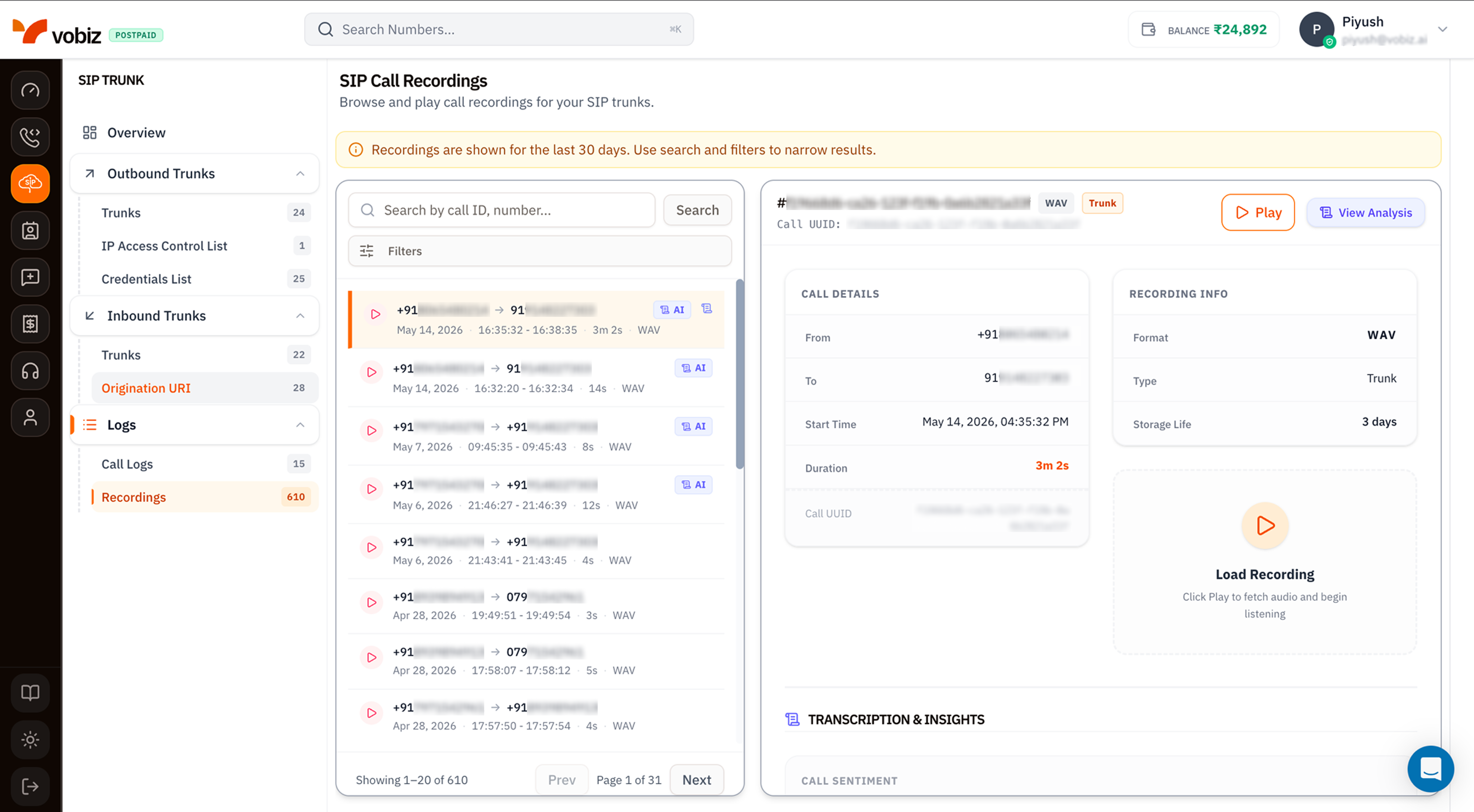 The page mirrors the [Voice Recordings](/platform/voice/recordings) page exactly - same retention banner, same recording list, same details panel and inline player.
## The differences from Voice Recordings
| Element | SIP Recordings | Voice Recordings |
| -------------- | ------------------------------------------------------------------------------------------------------------------------------------------------------------------------------------------------------ | ---------------------------------------------------------------------------- |
| **Scope** | Recordings produced by SIP trunks (inbound + outbound). | Recordings produced by XML applications. |
| **Type badge** | `Trunk` on every row. | `Call` for standard XML‑driven recordings, `Conference` for conference legs. |
| **Source** | Recording enabled per trunk via [Outbound Trunks → Call Recording](/platform/sip/outbound-trunks#recording--transcription-toggles) or [Inbound Trunks → Call Recording](/platform/sip/inbound-trunks). | Recording started via `` XML verb or REST `start_recording` call. |
Everything else is identical: 30‑day retention, lazy audio fetch, AI transcript + sentiment, same filter modal, same Call UUID cross‑reference with [SIP Call Logs](/platform/sip/call-logs).
## Recording details panel
| Field | Meaning |
| ---------------------------- | ------------------------------------------------------------------------------------------------------- |
| **Recording ID** | `#` shown above the action buttons. |
| **Format** | `WAV` (8 kHz mono PCM) or `MP3` (CBR 64 kbps). |
| **Type** | `Trunk` for SIP recordings. |
| **Play / View Analysis** | Inline playback or AI breakdown. |
| **Call Details** | From, To, Start Time, Duration, Call UUID - Call UUID matches [SIP Call Logs](/platform/sip/call-logs). |
| **Recording Info** | Format, Type, Storage Life (days remaining before auto‑delete). |
| **Transcription & Insights** | Speaker‑labelled transcript plus per‑speaker sentiment. |
## Tips
* **Enable recording per trunk, not globally.** Recording every call gets expensive - keep it on for the agent/production trunks that actually need audit trails.
* **Export critical recordings within 30 days.** Retention is hard - see [Export historical recordings](/recording/export-historical-recordings) before they age out.
* **Use Call UUID** to jump back to the originating [SIP Call Log](/platform/sip/call-logs) entry - quoting the Recording ID in support tickets is fine, but the Call UUID gives Vobiz support the full SIP trace.
## What's next
Per‑call records that produced these recordings.
Programmatic access - list, download, delete, bulk export.
The page mirrors the [Voice Recordings](/platform/voice/recordings) page exactly - same retention banner, same recording list, same details panel and inline player.
## The differences from Voice Recordings
| Element | SIP Recordings | Voice Recordings |
| -------------- | ------------------------------------------------------------------------------------------------------------------------------------------------------------------------------------------------------ | ---------------------------------------------------------------------------- |
| **Scope** | Recordings produced by SIP trunks (inbound + outbound). | Recordings produced by XML applications. |
| **Type badge** | `Trunk` on every row. | `Call` for standard XML‑driven recordings, `Conference` for conference legs. |
| **Source** | Recording enabled per trunk via [Outbound Trunks → Call Recording](/platform/sip/outbound-trunks#recording--transcription-toggles) or [Inbound Trunks → Call Recording](/platform/sip/inbound-trunks). | Recording started via `` XML verb or REST `start_recording` call. |
Everything else is identical: 30‑day retention, lazy audio fetch, AI transcript + sentiment, same filter modal, same Call UUID cross‑reference with [SIP Call Logs](/platform/sip/call-logs).
## Recording details panel
| Field | Meaning |
| ---------------------------- | ------------------------------------------------------------------------------------------------------- |
| **Recording ID** | `#` shown above the action buttons. |
| **Format** | `WAV` (8 kHz mono PCM) or `MP3` (CBR 64 kbps). |
| **Type** | `Trunk` for SIP recordings. |
| **Play / View Analysis** | Inline playback or AI breakdown. |
| **Call Details** | From, To, Start Time, Duration, Call UUID - Call UUID matches [SIP Call Logs](/platform/sip/call-logs). |
| **Recording Info** | Format, Type, Storage Life (days remaining before auto‑delete). |
| **Transcription & Insights** | Speaker‑labelled transcript plus per‑speaker sentiment. |
## Tips
* **Enable recording per trunk, not globally.** Recording every call gets expensive - keep it on for the agent/production trunks that actually need audit trails.
* **Export critical recordings within 30 days.** Retention is hard - see [Export historical recordings](/recording/export-historical-recordings) before they age out.
* **Use Call UUID** to jump back to the originating [SIP Call Log](/platform/sip/call-logs) entry - quoting the Recording ID in support tickets is fine, but the Call UUID gives Vobiz support the full SIP trace.
## What's next
Per‑call records that produced these recordings.
Programmatic access - list, download, delete, bulk export.