> ## Documentation Index
> Fetch the complete documentation index at: https://docs.vobiz.ai/llms.txt
> Use this file to discover all available pages before exploring further.
# SIP Trunking Overview - Global Voice Connectivity
> The SIP Trunking hub in the Vobiz Console - usage tiles, outbound termination, inbound origination, and end-to-end how-it-works diagrams. Configure your PBX, AI agent, or VoIP stack to place and receive calls in 130+ countries.
The **SIP Trunking** section of the Vobiz Console is where you wire your PBX, AI agent, or VoIP stack to the Vobiz global voice network - outbound termination to any number worldwide, inbound origination to your phone numbers, with per‑trunk recording, transcription, PII redaction, and webhooks.
```text URL theme={null}
https://console.vobiz.ai/app/sip
```
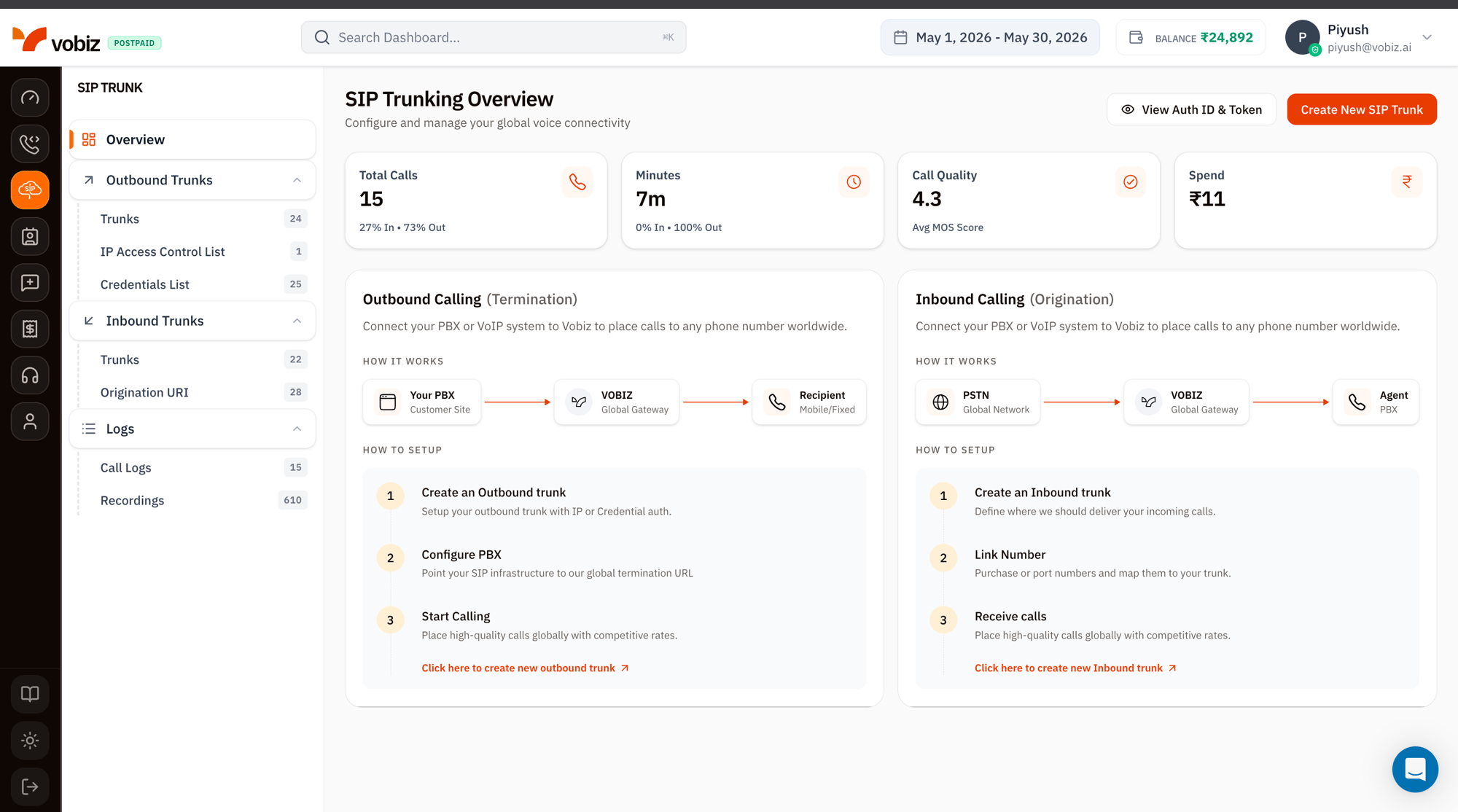 ## The SIP Trunking sidebar
The left navigation mirrors the SIP Trunk console exactly. Each item links to its dedicated walkthrough:
| Group | Page | What you do there |
| ------------------- | ------------------------------------------------------------------ | ---------------------------------------------------------------------- |
| – | **[Overview](/platform/sip/overview)** | You're here - usage tiles and how‑it‑works. |
| **Outbound Trunks** | **[Trunks](/platform/sip/outbound-trunks)** | Outbound termination trunks - point your PBX to Vobiz to place calls. |
| | **[IP Access Control List](/platform/sip/ip-access-control-list)** | Whitelist your PBX's source IPs for IP‑based auth. |
| | **[Credentials List](/platform/sip/credentials)** | SIP usernames + passwords for credential‑based auth. |
| **Inbound Trunks** | **[Trunks](/platform/sip/inbound-trunks)** | Origination trunks - Vobiz delivers inbound calls to your destination. |
| | **[Origination URI](/platform/sip/origination-uri)** | The SIP URI Vobiz forwards inbound calls to. |
| **Logs** | **[Call Logs](/platform/sip/call-logs)** | Per‑call records with MOS, quality, recording, and AI transcription. |
| | **[Recordings](/platform/sip/recordings)** | Stored WAV / MP3 audio for the last 30 days. |
## Usage tiles
Four KPI tiles summarising SIP‑only traffic for the selected [date range](/platform/dashboard#top-bar):
| Tile | What it measures |
| ---------------- | ------------------------------------------------------------------------------------- |
| **Total Calls** | Every SIP attempt. Split by `% In / % Out` shows the inbound / outbound mix. |
| **Minutes** | Sum of billable talk time. The `% In · % Out` line breaks down direction. |
| **Call Quality** | Average MOS (Mean Opinion Score) across the period. 4.0+ is good, 3.5–4.0 acceptable. |
| **Spend** | INR spent on SIP traffic only (excludes Voice API). |
## Outbound Calling (Termination)
The right‑side "How it works" panel walks the path **Your PBX → Vobiz Global Gateway → Recipient (mobile / fixed line)**.
| Step | What to do |
| ------------------------------- | ---------------------------------------------------------------------------------------------------------- |
| **1. Create an Outbound trunk** | Set up the trunk with **IP** or **Credential** auth. See [Outbound Trunks](/platform/sip/outbound-trunks). |
| **2. Configure PBX** | Point your SIP infrastructure at the trunk's `SIP Domain` (e.g. `.sip.vobiz.ai`). |
| **3. Start Calling** | Place calls to any number worldwide at Vobiz rates. |
Click **Create New SIP Trunk** in the top‑right of the overview, or **Click here to create new outbound trunk** at the bottom of the Outbound panel.
## Inbound Calling (Origination)
The left‑side panel walks the path **PSTN Global Network → Vobiz Global Gateway → your Agent / PBX / soft‑switch**.
| Step | What to do |
| ------------------------------ | ---------------------------------------------------------------------------------------------------------- |
| **1. Create an Inbound trunk** | Define where Vobiz should deliver your incoming calls. See [Inbound Trunks](/platform/sip/inbound-trunks). |
| **2. Link Number** | Purchase or port phone numbers and map them to the trunk. |
| **3. Receive calls** | Vobiz forwards inbound calls to your [Origination URI](/platform/sip/origination-uri). |
## View Auth ID & Token
The **View Auth ID & Token** button (top‑right) reveals your API credentials in a modal - same values as the [main Dashboard](/platform/dashboard#api-credentials), surfaced here for convenience when scripting SIP trunk provisioning via the [Trunks API](/trunks).
The Auth Token grants full API access. Treat it like a password - never paste it into client‑side code or public repos.
## What's next
Connect your PBX to place calls worldwide.
Receive PSTN calls to your numbers.
## The SIP Trunking sidebar
The left navigation mirrors the SIP Trunk console exactly. Each item links to its dedicated walkthrough:
| Group | Page | What you do there |
| ------------------- | ------------------------------------------------------------------ | ---------------------------------------------------------------------- |
| – | **[Overview](/platform/sip/overview)** | You're here - usage tiles and how‑it‑works. |
| **Outbound Trunks** | **[Trunks](/platform/sip/outbound-trunks)** | Outbound termination trunks - point your PBX to Vobiz to place calls. |
| | **[IP Access Control List](/platform/sip/ip-access-control-list)** | Whitelist your PBX's source IPs for IP‑based auth. |
| | **[Credentials List](/platform/sip/credentials)** | SIP usernames + passwords for credential‑based auth. |
| **Inbound Trunks** | **[Trunks](/platform/sip/inbound-trunks)** | Origination trunks - Vobiz delivers inbound calls to your destination. |
| | **[Origination URI](/platform/sip/origination-uri)** | The SIP URI Vobiz forwards inbound calls to. |
| **Logs** | **[Call Logs](/platform/sip/call-logs)** | Per‑call records with MOS, quality, recording, and AI transcription. |
| | **[Recordings](/platform/sip/recordings)** | Stored WAV / MP3 audio for the last 30 days. |
## Usage tiles
Four KPI tiles summarising SIP‑only traffic for the selected [date range](/platform/dashboard#top-bar):
| Tile | What it measures |
| ---------------- | ------------------------------------------------------------------------------------- |
| **Total Calls** | Every SIP attempt. Split by `% In / % Out` shows the inbound / outbound mix. |
| **Minutes** | Sum of billable talk time. The `% In · % Out` line breaks down direction. |
| **Call Quality** | Average MOS (Mean Opinion Score) across the period. 4.0+ is good, 3.5–4.0 acceptable. |
| **Spend** | INR spent on SIP traffic only (excludes Voice API). |
## Outbound Calling (Termination)
The right‑side "How it works" panel walks the path **Your PBX → Vobiz Global Gateway → Recipient (mobile / fixed line)**.
| Step | What to do |
| ------------------------------- | ---------------------------------------------------------------------------------------------------------- |
| **1. Create an Outbound trunk** | Set up the trunk with **IP** or **Credential** auth. See [Outbound Trunks](/platform/sip/outbound-trunks). |
| **2. Configure PBX** | Point your SIP infrastructure at the trunk's `SIP Domain` (e.g. `.sip.vobiz.ai`). |
| **3. Start Calling** | Place calls to any number worldwide at Vobiz rates. |
Click **Create New SIP Trunk** in the top‑right of the overview, or **Click here to create new outbound trunk** at the bottom of the Outbound panel.
## Inbound Calling (Origination)
The left‑side panel walks the path **PSTN Global Network → Vobiz Global Gateway → your Agent / PBX / soft‑switch**.
| Step | What to do |
| ------------------------------ | ---------------------------------------------------------------------------------------------------------- |
| **1. Create an Inbound trunk** | Define where Vobiz should deliver your incoming calls. See [Inbound Trunks](/platform/sip/inbound-trunks). |
| **2. Link Number** | Purchase or port phone numbers and map them to the trunk. |
| **3. Receive calls** | Vobiz forwards inbound calls to your [Origination URI](/platform/sip/origination-uri). |
## View Auth ID & Token
The **View Auth ID & Token** button (top‑right) reveals your API credentials in a modal - same values as the [main Dashboard](/platform/dashboard#api-credentials), surfaced here for convenience when scripting SIP trunk provisioning via the [Trunks API](/trunks).
The Auth Token grants full API access. Treat it like a password - never paste it into client‑side code or public repos.
## What's next
Connect your PBX to place calls worldwide.
Receive PSTN calls to your numbers.