> ## Documentation Index
> Fetch the complete documentation index at: https://docs.vobiz.ai/llms.txt
> Use this file to discover all available pages before exploring further.
# IP Access Control List (ACL) - Whitelist PBX Source IPs
> Create IP Access Control Lists in the Vobiz Console to authorise specific source IPs or CIDR ranges to send SIP traffic to your outbound trunks. Walkthrough of the ACL list, details, and Create IP Access Control List form.
An **IP Access Control List (ACL)** is a list of source IP addresses or CIDR ranges Vobiz will accept SIP traffic from on a given outbound trunk. Use it instead of (or alongside) [SIP credentials](/platform/sip/credentials) when your PBX has a stable, public IP.
```text URL theme={null}
https://console.vobiz.ai/app/sip/out/ipacl
```
## The IP ACL list
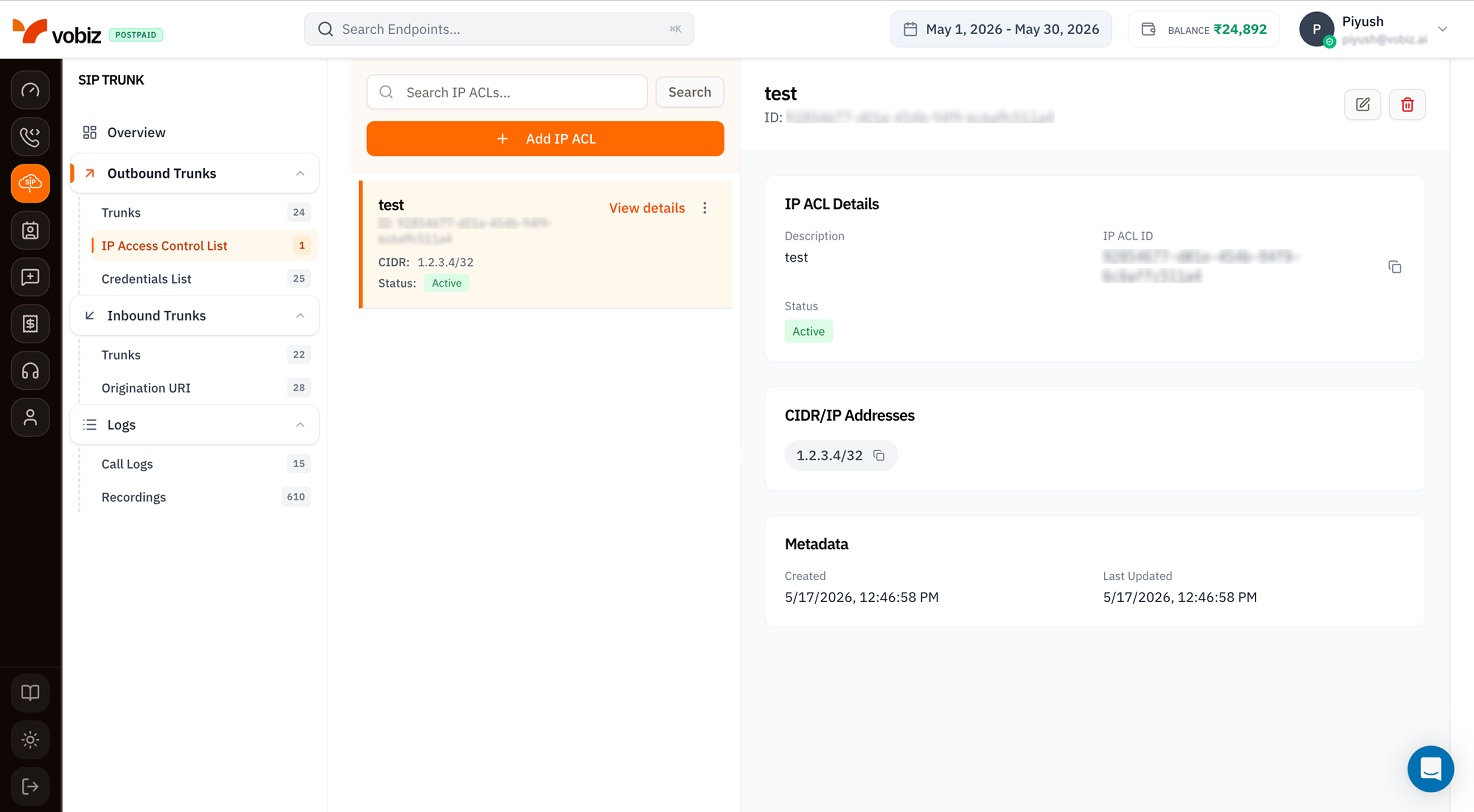 | Column | Meaning |
| ---------- | ------------------------------------------------------------------------------------------------- |
| **Name** | Friendly label (e.g. `Mumbai DC`, `Asterisk prod`). |
| **ID** | Immutable UUID - quote in support tickets. |
| **CIDR** | The IP range(s). `1.2.3.4/32` means just that one IP; `203.0.113.0/24` means a whole /24 block. |
| **Status** | `Active` accepts traffic; `Inactive` rejects everything from those IPs without removing the rule. |
Click any card to load its details on the right.
## Details panel
| Section | Field | Meaning |
| --------------------- | ---------------------- | ---------------------------------------- |
| **IP ACL Details** | Description | Friendly name. |
| | IP ACL ID | Immutable UUID. |
| | Status | `Active` or `Inactive`. |
| **CIDR/IP Addresses** | One chip per entry | All IPs/ranges associated with this ACL. |
| **Metadata** | Created / Last Updated | Both in your browser timezone. |
## Create an IP ACL
Click **+ Add IP ACL** to open the side panel.
| Column | Meaning |
| ---------- | ------------------------------------------------------------------------------------------------- |
| **Name** | Friendly label (e.g. `Mumbai DC`, `Asterisk prod`). |
| **ID** | Immutable UUID - quote in support tickets. |
| **CIDR** | The IP range(s). `1.2.3.4/32` means just that one IP; `203.0.113.0/24` means a whole /24 block. |
| **Status** | `Active` accepts traffic; `Inactive` rejects everything from those IPs without removing the rule. |
Click any card to load its details on the right.
## Details panel
| Section | Field | Meaning |
| --------------------- | ---------------------- | ---------------------------------------- |
| **IP ACL Details** | Description | Friendly name. |
| | IP ACL ID | Immutable UUID. |
| | Status | `Active` or `Inactive`. |
| **CIDR/IP Addresses** | One chip per entry | All IPs/ranges associated with this ACL. |
| **Metadata** | Created / Last Updated | Both in your browser timezone. |
## Create an IP ACL
Click **+ Add IP ACL** to open the side panel.
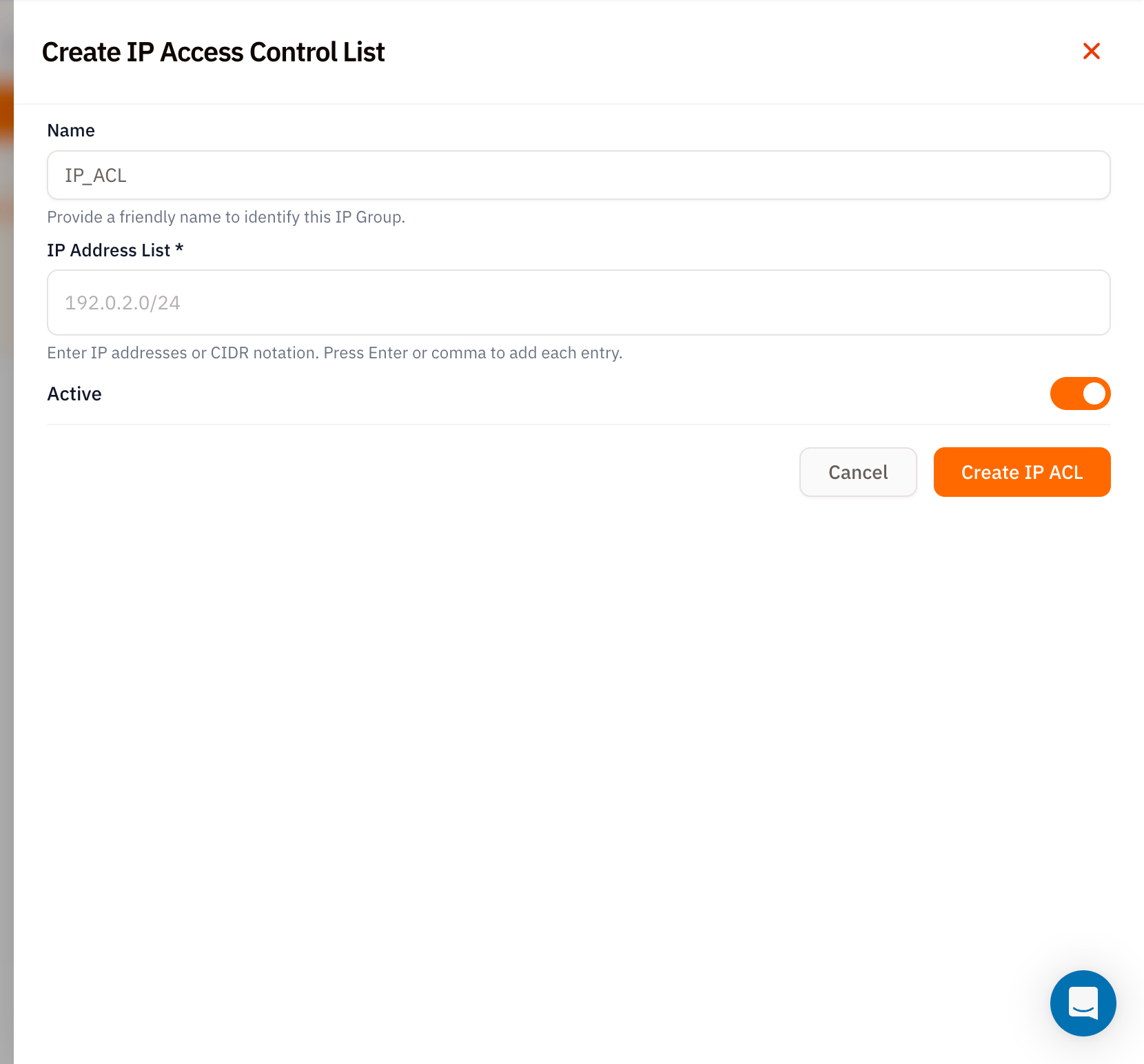 | Field | Required | Notes |
| ------------------- | -------- | --------------------------------------------------------------------------------------------------------------------------------------------------------- |
| **Name** | – | Friendly identifier. Defaults to `IP_ACL` if left blank. |
| **IP Address List** | ✅ | Type each IP or CIDR and press **Enter** (or `,`) to commit. Examples: `1.2.3.4` (single IP, auto‑expanded to `/32`), `203.0.113.0/24` (whole /24 block). |
| **Active** | – | Defaults on. Toggle off to provision the ACL but reject traffic. |
Click **Create IP ACL**.
## Use the ACL on a trunk
Once created:
1. Open an [Outbound Trunk](/platform/sip/outbound-trunks).
2. Edit the trunk and pick the new ACL from the **IP Access Control List** dropdown.
3. Save.
From now on, SIP INVITEs from any IP in the ACL are accepted without further auth.
## Tips
* **Use `/32` for single hosts.** A bare IP like `1.2.3.4` is normalised to `1.2.3.4/32` - but being explicit makes it obvious to anyone reading the list later.
* **Stack multiple entries on one ACL.** Easier than juggling several ACLs - one per environment is the sweet spot.
* **Toggle, don't delete.** When a PBX is temporarily offline, set the ACL to `Inactive` instead of removing entries - your config returns intact when the box comes back.
## What's next
Attach this ACL to a trunk.
Username + password auth as an alternative to IP ACL.
| Field | Required | Notes |
| ------------------- | -------- | --------------------------------------------------------------------------------------------------------------------------------------------------------- |
| **Name** | – | Friendly identifier. Defaults to `IP_ACL` if left blank. |
| **IP Address List** | ✅ | Type each IP or CIDR and press **Enter** (or `,`) to commit. Examples: `1.2.3.4` (single IP, auto‑expanded to `/32`), `203.0.113.0/24` (whole /24 block). |
| **Active** | – | Defaults on. Toggle off to provision the ACL but reject traffic. |
Click **Create IP ACL**.
## Use the ACL on a trunk
Once created:
1. Open an [Outbound Trunk](/platform/sip/outbound-trunks).
2. Edit the trunk and pick the new ACL from the **IP Access Control List** dropdown.
3. Save.
From now on, SIP INVITEs from any IP in the ACL are accepted without further auth.
## Tips
* **Use `/32` for single hosts.** A bare IP like `1.2.3.4` is normalised to `1.2.3.4/32` - but being explicit makes it obvious to anyone reading the list later.
* **Stack multiple entries on one ACL.** Easier than juggling several ACLs - one per environment is the sweet spot.
* **Toggle, don't delete.** When a PBX is temporarily offline, set the ACL to `Inactive` instead of removing entries - your config returns intact when the box comes back.
## What's next
Attach this ACL to a trunk.
Username + password auth as an alternative to IP ACL.