> ## Documentation Index
> Fetch the complete documentation index at: https://docs.vobiz.ai/llms.txt
> Use this file to discover all available pages before exploring further.
# Inbound Trunks - Receive PSTN Calls
> Create and manage inbound (origination) SIP trunks in the Vobiz Console - deliver incoming calls to your PBX or AI agent via a Primary URI, with per-trunk recording, AI transcription, PII redaction, and webhooks.
An **Inbound (origination) trunk** is the path Vobiz uses to deliver incoming PSTN calls to *your* SIP endpoint - typically a PBX, soft‑switch, or AI agent. Each trunk has its own Primary URI (the destination Vobiz forwards to), its own recording settings, and its own webhook.
```text URL theme={null}
https://console.vobiz.ai/app/sip/in/trunks
```
## The Inbound Trunks list
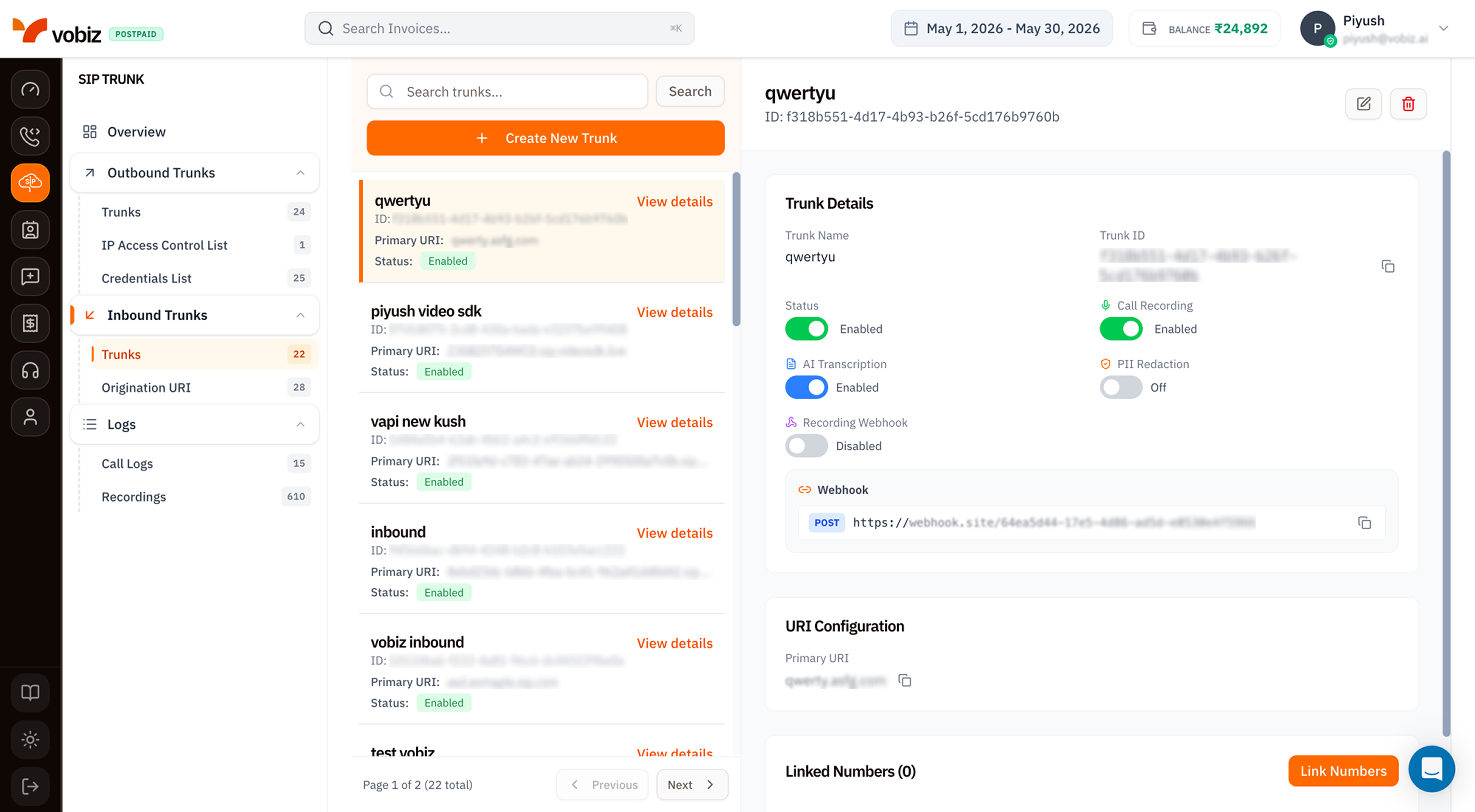 Same three‑column layout as outbound trunks - search + create on top, list on the left, details on the right.
## The trunk details panel
| Field | Meaning |
| --------------- | ------------------------------------------------------------------------------------------------------------------------------------- |
| **Trunk Name** | Friendly label. |
| **Trunk ID** | Immutable UUID - quote in support tickets. |
| **Status** | Toggle to enable/disable. A disabled trunk doesn't receive inbound calls - Vobiz returns a SIP error to the carrier. |
| **Primary URI** | The SIP URI Vobiz forwards inbound calls to (e.g. `qwerty.asfg.com`). One [Origination URI](/platform/sip/origination-uri) per trunk. |
### Recording & Transcription toggles
Identical to [outbound trunks](/platform/sip/outbound-trunks#recording--transcription-toggles): **Call Recording**, **AI Transcription**, **PII Redaction**, **Recording Webhook**. Each obeys the same prerequisite chain - transcription needs recording, redaction needs transcription.
### Webhook
A general‑purpose webhook URL Vobiz POSTs inbound‑call events to (`incoming.ringing`, `incoming.answered`, `incoming.ended`). Use it to track who's calling, drive a live CRM update, or log to your data warehouse.
### URI Configuration
| Field | Meaning |
| --------------- | --------------------------------------------------------------------------------------------------------------------------------------------------------- |
| **Primary URI** | The SIP destination. Vobiz forwards inbound INVITEs to this URI. Manage the list of available URIs from [Origination URI](/platform/sip/origination-uri). |
Click the copy icon (⧉) next to the URI to copy it to your clipboard.
### Linked Numbers
Below the URI Configuration card, the **Linked Numbers (N)** section lists every DID currently routing to this trunk. Click **Link Numbers** in the top‑right of the section to attach more numbers or detach existing ones.
## Create an Inbound Trunk
Click **+ Create New Trunk** to open the side panel.
Same three‑column layout as outbound trunks - search + create on top, list on the left, details on the right.
## The trunk details panel
| Field | Meaning |
| --------------- | ------------------------------------------------------------------------------------------------------------------------------------- |
| **Trunk Name** | Friendly label. |
| **Trunk ID** | Immutable UUID - quote in support tickets. |
| **Status** | Toggle to enable/disable. A disabled trunk doesn't receive inbound calls - Vobiz returns a SIP error to the carrier. |
| **Primary URI** | The SIP URI Vobiz forwards inbound calls to (e.g. `qwerty.asfg.com`). One [Origination URI](/platform/sip/origination-uri) per trunk. |
### Recording & Transcription toggles
Identical to [outbound trunks](/platform/sip/outbound-trunks#recording--transcription-toggles): **Call Recording**, **AI Transcription**, **PII Redaction**, **Recording Webhook**. Each obeys the same prerequisite chain - transcription needs recording, redaction needs transcription.
### Webhook
A general‑purpose webhook URL Vobiz POSTs inbound‑call events to (`incoming.ringing`, `incoming.answered`, `incoming.ended`). Use it to track who's calling, drive a live CRM update, or log to your data warehouse.
### URI Configuration
| Field | Meaning |
| --------------- | --------------------------------------------------------------------------------------------------------------------------------------------------------- |
| **Primary URI** | The SIP destination. Vobiz forwards inbound INVITEs to this URI. Manage the list of available URIs from [Origination URI](/platform/sip/origination-uri). |
Click the copy icon (⧉) next to the URI to copy it to your clipboard.
### Linked Numbers
Below the URI Configuration card, the **Linked Numbers (N)** section lists every DID currently routing to this trunk. Click **Link Numbers** in the top‑right of the section to attach more numbers or detach existing ones.
## Create an Inbound Trunk
Click **+ Create New Trunk** to open the side panel.
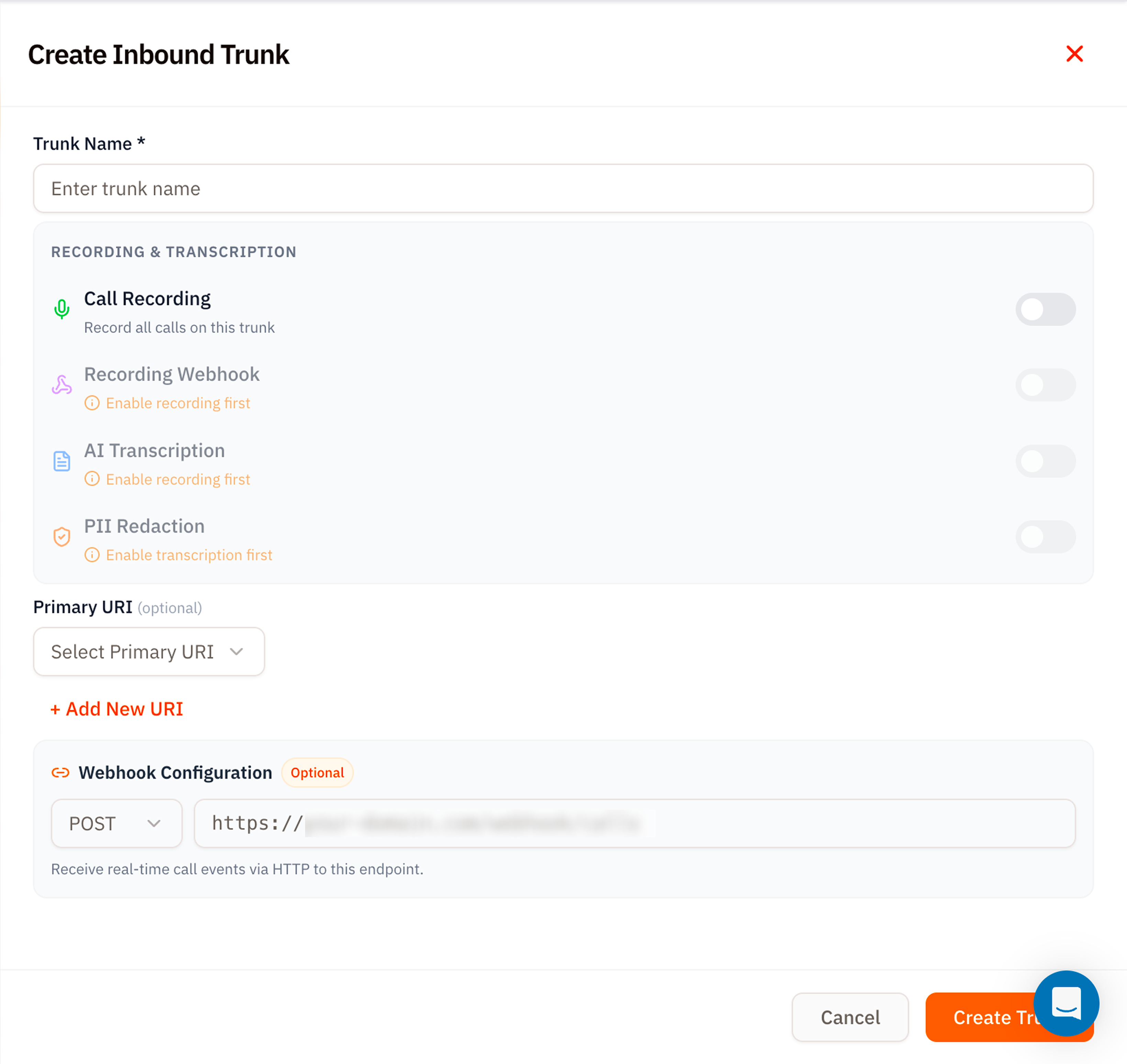 | Section | Field | Notes |
| ------------------------------------ | --------------------------------------------- | ---------------------------------------------------------------------------------------------------------------------- |
| **Trunk Name** | Required | A friendly label. |
| **Recording & Transcription** | Same four toggles as the trunk details panel. | – |
| **Primary URI (optional)** | Select Primary URI | Pick from existing [Origination URIs](/platform/sip/origination-uri), or click **+ Add New URI** to create one inline. |
| **Webhook Configuration (Optional)** | POST URL | Receive inbound call state events. |
Click **Create Trunk**.
## Linking numbers
After the trunk exists:
1. Open the trunk details.
2. Scroll to **Linked Numbers** and click **Link Numbers**.
3. Pick existing numbers from your account or buy new ones inline - same flow as the [Voice Applications attach‑number modal](/platform/voice/applications#attach-phone-numbers).
From the moment a number is linked, every call to that number forwards to the trunk's Primary URI.
## Tips
* **Use Origination URIs as named destinations.** Even if you only have one PBX, give the URI a name like `primary-pbx-mumbai` - it's clearer than a raw `1.2.3.4:5060`.
* **Webhook before recording.** If you only want call state for analytics, the webhook is enough - no need to enable recording.
* **Status toggle for maintenance windows.** Disable the trunk to fail‑fast on inbound (carrier returns "all circuits busy") instead of timing out on a dead PBX.
## What's next
Add or edit the SIP destinations Vobiz forwards to.
Buy or port the DIDs that ring this trunk.
| Section | Field | Notes |
| ------------------------------------ | --------------------------------------------- | ---------------------------------------------------------------------------------------------------------------------- |
| **Trunk Name** | Required | A friendly label. |
| **Recording & Transcription** | Same four toggles as the trunk details panel. | – |
| **Primary URI (optional)** | Select Primary URI | Pick from existing [Origination URIs](/platform/sip/origination-uri), or click **+ Add New URI** to create one inline. |
| **Webhook Configuration (Optional)** | POST URL | Receive inbound call state events. |
Click **Create Trunk**.
## Linking numbers
After the trunk exists:
1. Open the trunk details.
2. Scroll to **Linked Numbers** and click **Link Numbers**.
3. Pick existing numbers from your account or buy new ones inline - same flow as the [Voice Applications attach‑number modal](/platform/voice/applications#attach-phone-numbers).
From the moment a number is linked, every call to that number forwards to the trunk's Primary URI.
## Tips
* **Use Origination URIs as named destinations.** Even if you only have one PBX, give the URI a name like `primary-pbx-mumbai` - it's clearer than a raw `1.2.3.4:5060`.
* **Webhook before recording.** If you only want call state for analytics, the webhook is enough - no need to enable recording.
* **Status toggle for maintenance windows.** Disable the trunk to fail‑fast on inbound (carrier returns "all circuits busy") instead of timing out on a dead PBX.
## What's next
Add or edit the SIP destinations Vobiz forwards to.
Buy or port the DIDs that ring this trunk.