> ## Documentation Index
> Fetch the complete documentation index at: https://docs.vobiz.ai/llms.txt
> Use this file to discover all available pages before exploring further.
# SIP Call Logs - Per-Call Records & Quality
> Browse every SIP trunk call in the Vobiz Console - MOS scores, call timeline, hangup cause, transcription, recording playback, and CSV export. Filter by direction, caller/callee number, duration, and hangup cause.
The **SIP Call Logs** page is the per‑call audit trail for SIP trunk traffic - both inbound and outbound - with MOS scores, full SIP timeline, hangup cause, transcription button, and inline recording playback.
```text URL theme={null}
https://console.vobiz.ai/app/sip/logs
```
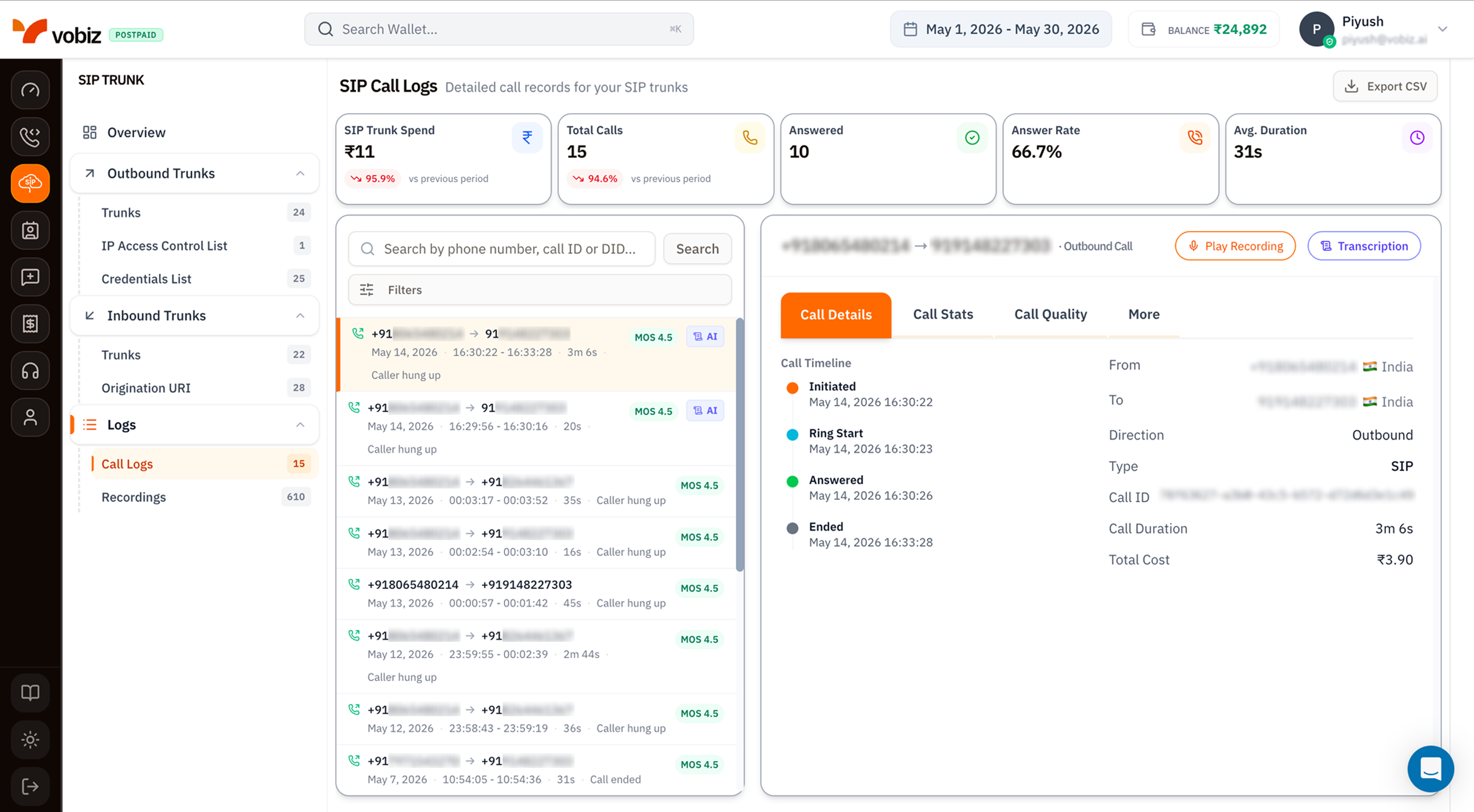 The layout, filters, and call details panel are **identical** to [Voice Call Logs](/platform/voice/call-logs) - same KPI tiles, same call list, same 4‑tab details. The differences:
| Element | SIP Call Logs | Voice Call Logs |
| ------------------------ | ------------------------------------------------------------------------------------------------------------------------------------------------------ | ------------------------------------------------------------------- |
| **Scope** | SIP trunk traffic only (inbound + outbound). | Voice API + XML applications. |
| **KPI tiles** | SIP Trunk Spend, Total Calls, Answered, Answer Rate, Avg. Duration. | Voice API Spend, Total Calls, Answered, Answer Rate, Avg. Duration. |
| **Type column** | Shows `SIP` for every row. | Shows `Voice Application`, `API`, or `SIP`. |
| **Recording button** | **Play Recording** (top‑right of details) when the trunk has [Call Recording](/platform/sip/outbound-trunks#recording--transcription-toggles) enabled. | Same button when an XML app recorded the call. |
| **Transcription button** | **Transcription** (top‑right of details) when AI Transcription is enabled. | Same button. |
## KPI tiles
| Tile | What it measures |
| ------------------- | ----------------------------------------------------- |
| **SIP Trunk Spend** | INR spent on SIP traffic for the selected date range. |
| **Total Calls** | Every SIP attempt. |
| **Answered** | The subset that connected. |
| **Answer Rate** | `Answered / Total Calls`. |
| **Avg. Duration** | Mean talk time across answered calls. |
## Call details panel
Same 4‑tab layout as Voice Call Logs - **Call Details**, **Call Stats**, **Call Quality**, **More**.
For SIP traffic specifically, the **More** tab adds:
* **SIP Trace** - raw INVITE / 100 / 180 / 200 / BYE messages with timing.
* **Hangup Cause Code** - the SIP cause code (`486 Busy Here`, `487 Request Terminated`, etc.) plus the friendly label.
* **Auth Method** - `IP ACL` or `Credentials`, useful for confirming which auth path the call used.
## Filters
Same modal as [Voice Call Logs filters](/platform/voice/call-logs#search-and-filter):
* Direction (All / Inbound / Outbound)
* From Number / To Number (substring)
* Min / Max Duration (seconds)
* Hangup Cause (dropdown)
## Export to CSV
The **Export CSV** button downloads every call in the current filter + date range as a CSV - same columns as Voice Call Logs, plus a `Trunk Name` and `Auth Method` column for SIP rows.
## Tips
* **Filter by Trunk** when triaging a specific PBX. Use search box with the trunk's name.
* **MOS \< 3.5** consistently on outbound suggests a network problem between *your* PBX and Vobiz - check **Call Stats** for packet loss and jitter.
* **Hangup Cause 486 Busy Here** in inbound logs means your PBX's lines are full - increase concurrency or load‑balance across trunks.
## What's next
Play and download audio for recorded SIP calls.
Pull the same data programmatically.
The layout, filters, and call details panel are **identical** to [Voice Call Logs](/platform/voice/call-logs) - same KPI tiles, same call list, same 4‑tab details. The differences:
| Element | SIP Call Logs | Voice Call Logs |
| ------------------------ | ------------------------------------------------------------------------------------------------------------------------------------------------------ | ------------------------------------------------------------------- |
| **Scope** | SIP trunk traffic only (inbound + outbound). | Voice API + XML applications. |
| **KPI tiles** | SIP Trunk Spend, Total Calls, Answered, Answer Rate, Avg. Duration. | Voice API Spend, Total Calls, Answered, Answer Rate, Avg. Duration. |
| **Type column** | Shows `SIP` for every row. | Shows `Voice Application`, `API`, or `SIP`. |
| **Recording button** | **Play Recording** (top‑right of details) when the trunk has [Call Recording](/platform/sip/outbound-trunks#recording--transcription-toggles) enabled. | Same button when an XML app recorded the call. |
| **Transcription button** | **Transcription** (top‑right of details) when AI Transcription is enabled. | Same button. |
## KPI tiles
| Tile | What it measures |
| ------------------- | ----------------------------------------------------- |
| **SIP Trunk Spend** | INR spent on SIP traffic for the selected date range. |
| **Total Calls** | Every SIP attempt. |
| **Answered** | The subset that connected. |
| **Answer Rate** | `Answered / Total Calls`. |
| **Avg. Duration** | Mean talk time across answered calls. |
## Call details panel
Same 4‑tab layout as Voice Call Logs - **Call Details**, **Call Stats**, **Call Quality**, **More**.
For SIP traffic specifically, the **More** tab adds:
* **SIP Trace** - raw INVITE / 100 / 180 / 200 / BYE messages with timing.
* **Hangup Cause Code** - the SIP cause code (`486 Busy Here`, `487 Request Terminated`, etc.) plus the friendly label.
* **Auth Method** - `IP ACL` or `Credentials`, useful for confirming which auth path the call used.
## Filters
Same modal as [Voice Call Logs filters](/platform/voice/call-logs#search-and-filter):
* Direction (All / Inbound / Outbound)
* From Number / To Number (substring)
* Min / Max Duration (seconds)
* Hangup Cause (dropdown)
## Export to CSV
The **Export CSV** button downloads every call in the current filter + date range as a CSV - same columns as Voice Call Logs, plus a `Trunk Name` and `Auth Method` column for SIP rows.
## Tips
* **Filter by Trunk** when triaging a specific PBX. Use search box with the trunk's name.
* **MOS \< 3.5** consistently on outbound suggests a network problem between *your* PBX and Vobiz - check **Call Stats** for packet loss and jitter.
* **Hangup Cause 486 Busy Here** in inbound logs means your PBX's lines are full - increase concurrency or load‑balance across trunks.
## What's next
Play and download audio for recorded SIP calls.
Pull the same data programmatically.