> ## Documentation Index
> Fetch the complete documentation index at: https://docs.vobiz.ai/llms.txt
> Use this file to discover all available pages before exploring further.
# Campaign Call Logs - Per-Attempt Outbound History
> Every attempt placed by every Vobiz campaign - answered, busy, no answer, failed - with attempt number, duration, cost, and Call UUID. Filter by campaign, phone, and status; export the current page or the full result set as CSV.
The **Campaign Call Logs** page is the per‑attempt audit trail for every Vobiz outbound campaign - answered, busy, no answer, or failed - enriched with the matching CDR (caller ID used, duration, cost, Call UUID) as soon as the attempt completes.
```text URL theme={null}
https://console.vobiz.ai/app/campaigns/cdr
```
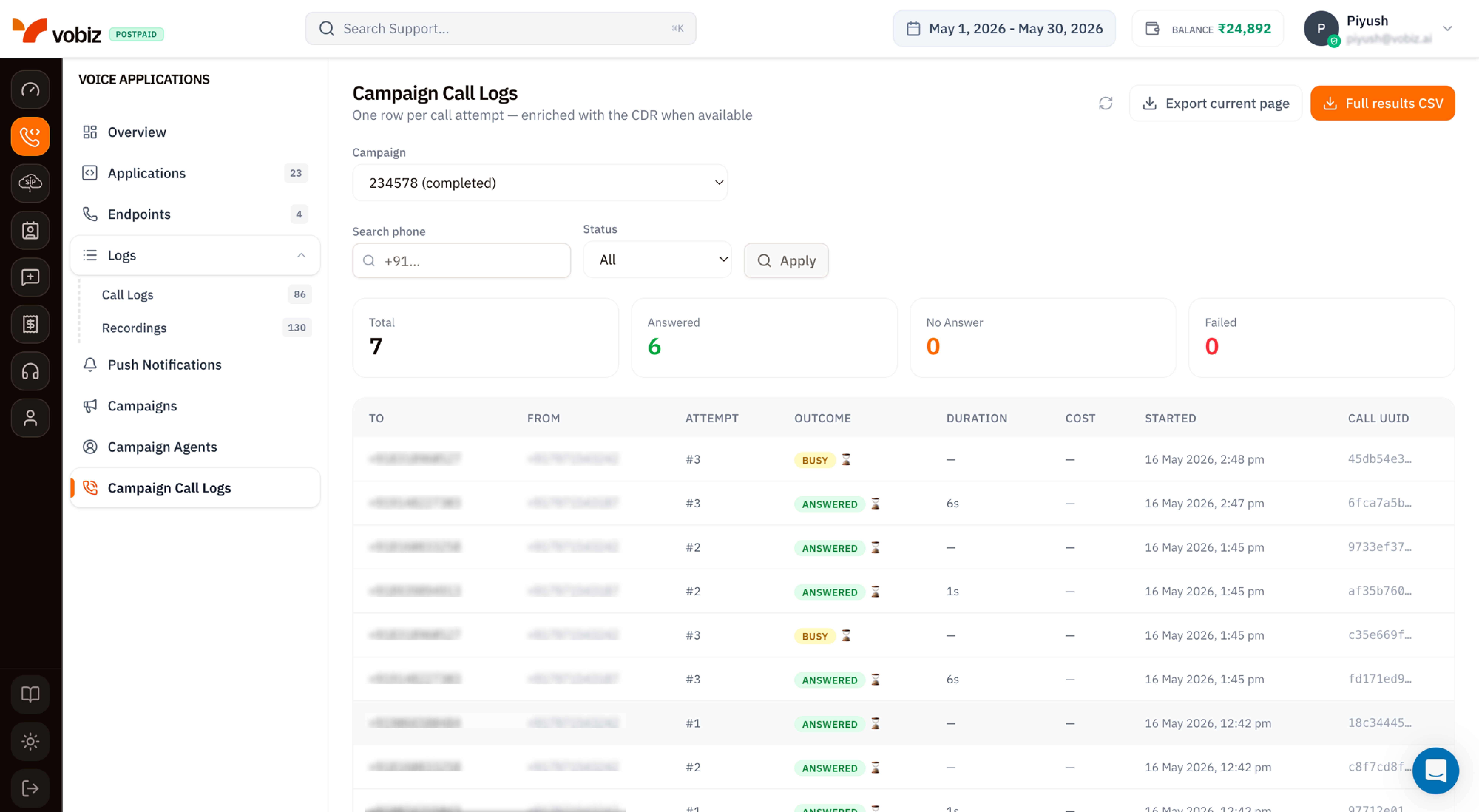 > **One row per call attempt - enriched with the CDR when available.**
A contact retried twice produces three rows: the original (`#1`) plus the two retries (`#2`, `#3`). The CDR - duration, cost, call quality - is stitched in once the attempt finishes; "in flight" rows show `—` for those fields until the call ends.
## Filters
Three controls sit above the KPI tiles. All three apply together; click **Apply** to refresh the table.
| Filter | Type | Use it for |
| ---------------- | --------- | ------------------------------------------------------------------------------------------------------------------------------------- |
| **Campaign** | Dropdown | Pick one campaign by ID and status (e.g. `234578 (completed)`). Required - the table only ever shows rows for one campaign at a time. |
| **Search phone** | Substring | Match against `to` or `from` numbers. Useful for finding "did we ever call this lead?" |
| **Status** | Dropdown | `All`, `Answered`, `Busy`, `No Answer`, `Failed`, `In progress`. |
## KPI tiles
Four counters reflecting the **current campaign + filter set**.
| Tile | What it counts |
| ---------------------- | ----------------------------------------------------------- |
| **Total** | Every attempt visible under the active filters. |
| **Answered** (green) | The subset that connected - callee picked up. |
| **No Answer** (orange) | Rang out without being picked up. |
| **Failed** (red) | Network errors, rejected by the carrier, or invalid number. |
`Busy` attempts aren't a top‑line tile - they show in the table's **Outcome** column. Use the **Status = Busy** filter if you need a count.
## Table columns
| Column | Meaning |
| ------------- | ------------------------------------------------------------------------------------------------------------------------------------------------------- |
| **TO** | Destination number from the [Contacts CSV](/platform/campaigns/list#contacts-csv-required-to-start). |
| **FROM** | Caller ID used for this specific attempt - picked from your [pool](/platform/campaigns/list#3-caller-id-strategy) via the configured rotation strategy. |
| **ATTEMPT** | `#1` for the original, `#2+` for retries. Tied to the campaign's [Retry Attempts](/platform/campaigns/list#8-retry-attempts) setting. |
| **OUTCOME** | Badge: `ANSWERED`, `BUSY`, `NO ANSWER`, `FAILED`, `IN PROGRESS`. The ⏳ hourglass icon means the row is still being enriched with CDR data. |
| **DURATION** | Talk time. `—` for unanswered attempts. |
| **COST** | INR billed for the attempt. `—` until the CDR lands. |
| **STARTED** | Timestamp the dial fired, in your browser timezone. |
| **CALL UUID** | Canonical Vobiz Call ID - quote this in support tickets and use it to cross‑reference [Voice Call Logs](/platform/voice/call-logs). |
Click any row to open the full call detail (same panel as Voice Call Logs).
## Export
Two buttons in the top‑right:
| Button | What you get |
| ----------------------- | -------------------------------------------------------------------------------------------------------------------------------------- |
| **Export current page** | CSV of just the rows visible on the current page (default 20 rows). Fast - fires immediately. |
| **Full results CSV** | CSV of every row matching the current campaign + filters across all pages. Queued server‑side; large campaigns can take a few seconds. |
The CSV columns mirror the table plus a few extras: the `Call UUID` is the full UUID (not truncated), `Hangup Cause` is added, and a `Recording URL` column appears for attempts that produced audio.
## Tips
* **Filter by Status = Failed first** when a campaign underperforms. Failed attempts cluster - fix the systemic cause (invalid number format, blocked country, expired trunk credential) before retrying.
* **Cross‑reference Attempt #.** A contact that retried 3× and never connected is a dead lead - drop them from the next campaign upload.
* **Quote the Call UUID**, never the row number or campaign name, when filing a Vobiz support ticket.
* **In‑progress rows refresh on Apply.** Hitting **Apply** with the same filters is the easiest way to re‑poll without leaving the page.
## What's next
Pause underperforming campaigns or launch new ones.
The same call viewed alongside non‑campaign traffic.
> **One row per call attempt - enriched with the CDR when available.**
A contact retried twice produces three rows: the original (`#1`) plus the two retries (`#2`, `#3`). The CDR - duration, cost, call quality - is stitched in once the attempt finishes; "in flight" rows show `—` for those fields until the call ends.
## Filters
Three controls sit above the KPI tiles. All three apply together; click **Apply** to refresh the table.
| Filter | Type | Use it for |
| ---------------- | --------- | ------------------------------------------------------------------------------------------------------------------------------------- |
| **Campaign** | Dropdown | Pick one campaign by ID and status (e.g. `234578 (completed)`). Required - the table only ever shows rows for one campaign at a time. |
| **Search phone** | Substring | Match against `to` or `from` numbers. Useful for finding "did we ever call this lead?" |
| **Status** | Dropdown | `All`, `Answered`, `Busy`, `No Answer`, `Failed`, `In progress`. |
## KPI tiles
Four counters reflecting the **current campaign + filter set**.
| Tile | What it counts |
| ---------------------- | ----------------------------------------------------------- |
| **Total** | Every attempt visible under the active filters. |
| **Answered** (green) | The subset that connected - callee picked up. |
| **No Answer** (orange) | Rang out without being picked up. |
| **Failed** (red) | Network errors, rejected by the carrier, or invalid number. |
`Busy` attempts aren't a top‑line tile - they show in the table's **Outcome** column. Use the **Status = Busy** filter if you need a count.
## Table columns
| Column | Meaning |
| ------------- | ------------------------------------------------------------------------------------------------------------------------------------------------------- |
| **TO** | Destination number from the [Contacts CSV](/platform/campaigns/list#contacts-csv-required-to-start). |
| **FROM** | Caller ID used for this specific attempt - picked from your [pool](/platform/campaigns/list#3-caller-id-strategy) via the configured rotation strategy. |
| **ATTEMPT** | `#1` for the original, `#2+` for retries. Tied to the campaign's [Retry Attempts](/platform/campaigns/list#8-retry-attempts) setting. |
| **OUTCOME** | Badge: `ANSWERED`, `BUSY`, `NO ANSWER`, `FAILED`, `IN PROGRESS`. The ⏳ hourglass icon means the row is still being enriched with CDR data. |
| **DURATION** | Talk time. `—` for unanswered attempts. |
| **COST** | INR billed for the attempt. `—` until the CDR lands. |
| **STARTED** | Timestamp the dial fired, in your browser timezone. |
| **CALL UUID** | Canonical Vobiz Call ID - quote this in support tickets and use it to cross‑reference [Voice Call Logs](/platform/voice/call-logs). |
Click any row to open the full call detail (same panel as Voice Call Logs).
## Export
Two buttons in the top‑right:
| Button | What you get |
| ----------------------- | -------------------------------------------------------------------------------------------------------------------------------------- |
| **Export current page** | CSV of just the rows visible on the current page (default 20 rows). Fast - fires immediately. |
| **Full results CSV** | CSV of every row matching the current campaign + filters across all pages. Queued server‑side; large campaigns can take a few seconds. |
The CSV columns mirror the table plus a few extras: the `Call UUID` is the full UUID (not truncated), `Hangup Cause` is added, and a `Recording URL` column appears for attempts that produced audio.
## Tips
* **Filter by Status = Failed first** when a campaign underperforms. Failed attempts cluster - fix the systemic cause (invalid number format, blocked country, expired trunk credential) before retrying.
* **Cross‑reference Attempt #.** A contact that retried 3× and never connected is a dead lead - drop them from the next campaign upload.
* **Quote the Call UUID**, never the row number or campaign name, when filing a Vobiz support ticket.
* **In‑progress rows refresh on Apply.** Hitting **Apply** with the same filters is the easiest way to re‑poll without leaving the page.
## What's next
Pause underperforming campaigns or launch new ones.
The same call viewed alongside non‑campaign traffic.