> ## Documentation Index
> Fetch the complete documentation index at: https://docs.vobiz.ai/llms.txt
> Use this file to discover all available pages before exploring further.
# Campaign Agents - Reusable Webhook Configs
> Create reusable Campaign Agents in the Vobiz Console - shared answer/hangup webhook configurations used by one or more outbound campaigns. Walkthrough of the agents list, the New Agent form, and Static SIP Headers.
A **Campaign Agent** is a reusable bundle of webhook configuration - the Answer URL, the Hangup URL, and any static SIP headers - that one or more campaigns share. Create the agent once and you can launch a hundred campaigns against it without re‑typing those URLs.
```text URL theme={null}
https://console.vobiz.ai/app/campaigns/agents
```
## The Agents list
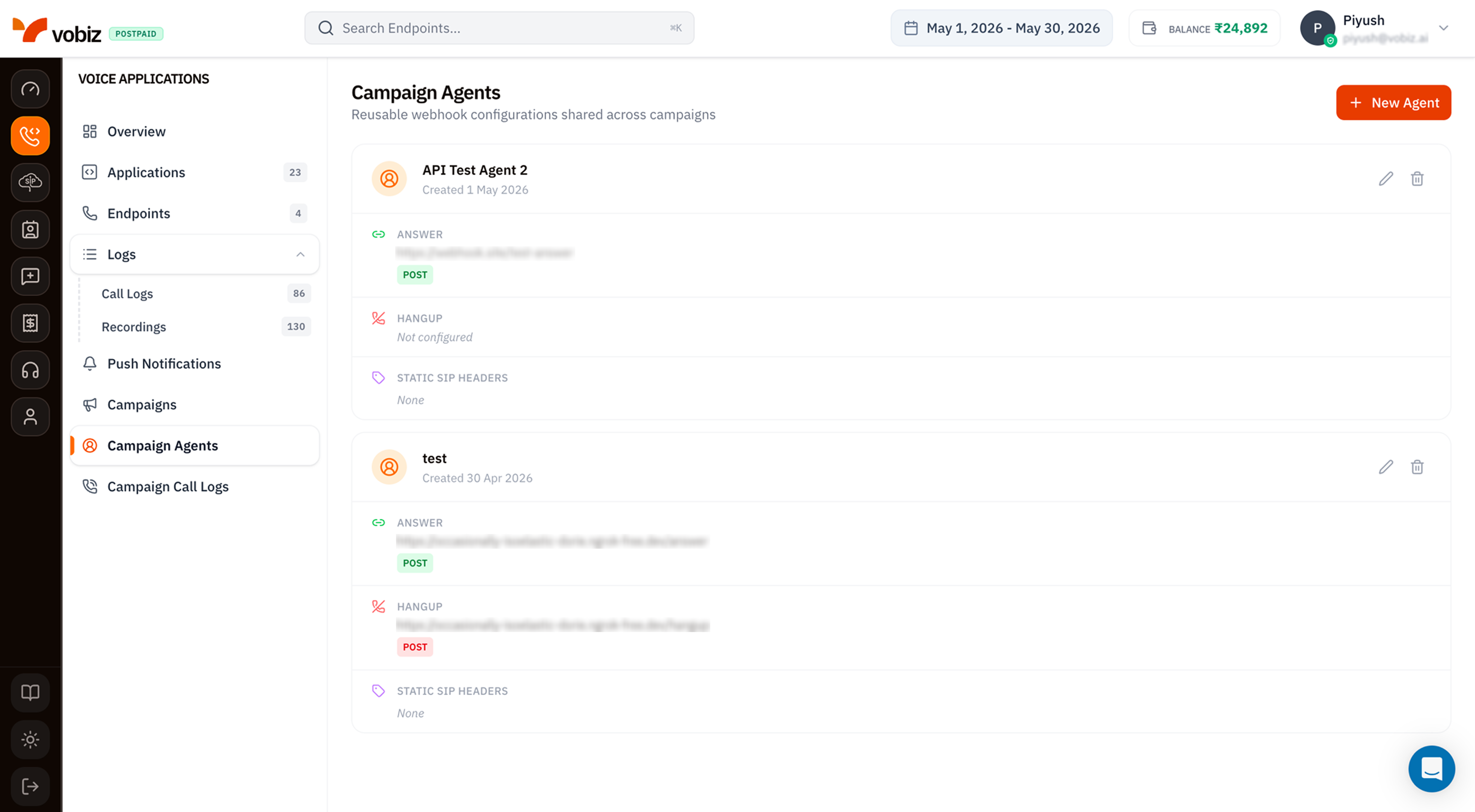 Each Agent card shows:
| Section | What it contains |
| ---------------------- | ----------------------------------------------------------------------------------------------------- |
| **Header** | Friendly name (e.g. `API Test Agent 2`) and the creation date. |
| **Answer** | The URL Vobiz POSTs (or GETs) when a campaign call connects - your server's IVR / AI flow lives here. |
| **Hangup** | Where Vobiz POSTs the final call result. Shown as *Not configured* if you skipped it. |
| **Static SIP Headers** | Custom headers Vobiz attaches to every campaign call placed through this agent (none by default). |
The pencil/trash icons on each card let you edit or delete the Agent. Deleting an Agent only succeeds if no active campaigns reference it - pause those campaigns first.
## Create a new Agent
Click **+ New Agent** in the top‑right.
Each Agent card shows:
| Section | What it contains |
| ---------------------- | ----------------------------------------------------------------------------------------------------- |
| **Header** | Friendly name (e.g. `API Test Agent 2`) and the creation date. |
| **Answer** | The URL Vobiz POSTs (or GETs) when a campaign call connects - your server's IVR / AI flow lives here. |
| **Hangup** | Where Vobiz POSTs the final call result. Shown as *Not configured* if you skipped it. |
| **Static SIP Headers** | Custom headers Vobiz attaches to every campaign call placed through this agent (none by default). |
The pencil/trash icons on each card let you edit or delete the Agent. Deleting an Agent only succeeds if no active campaigns reference it - pause those campaigns first.
## Create a new Agent
Click **+ New Agent** in the top‑right.
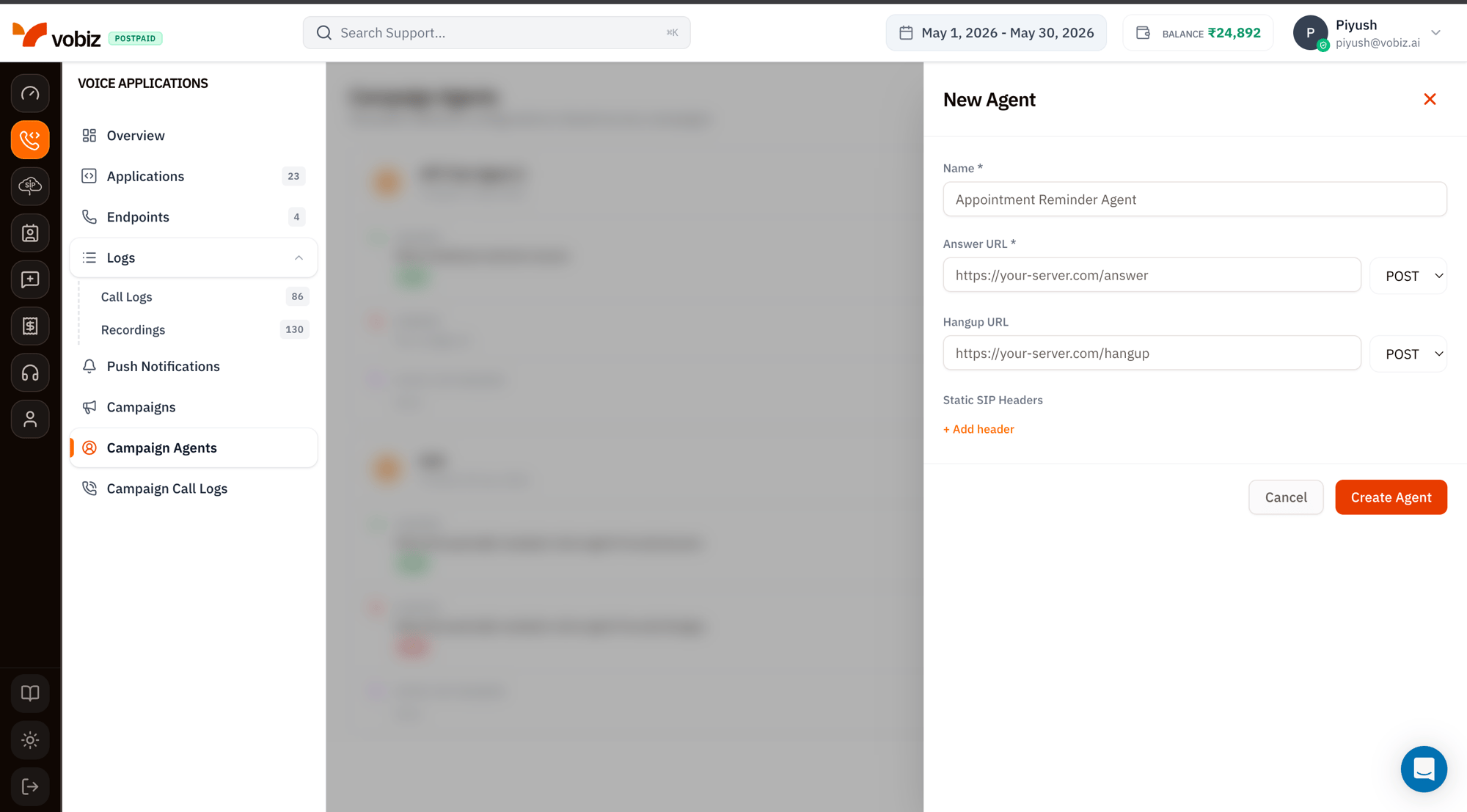 | Field | Required | Notes |
| ---------------------- | -------- | --------------------------------------------------------------------------------------------------------------------------------------------------------------------------- |
| **Name** | ✅ | Something descriptive - *"Appointment Reminder Agent"*, *"Q4 Survey Bot"*. You'll pick this from a dropdown when creating campaigns. |
| **Answer URL** | ✅ | Method (`POST` recommended) + URL. Vobiz hits this when a campaign call is answered. Same XML conventions as a normal [XML application](/platform/voice/applications). |
| **Hangup URL** | – | Optional. Vobiz POSTs the call result here when the call ends. Recommended in production - most analytics depend on it. |
| **Static SIP Headers** | – | Click **+ Add header** to attach key/value pairs that Vobiz sends with every outgoing INVITE. Use for tagging traffic (`X-Campaign-Source: q4-reminders`) or routing hints. |
Click **Create Agent**.
## Static SIP Headers - when to use them
The headers you add here are attached to every INVITE Vobiz sends on behalf of campaigns that use this agent. Common patterns:
* **`X-Campaign-Source`** - tag for your downstream PBX or CRM to know the source.
* **`P-Asserted-Identity`** - carrier‑specific identity routing (check with your trunk provider first).
* **`X-RingTime`** - pass a max ring time hint to the receiving system.
Static headers apply to **every** call from every campaign that uses this agent. If you need per‑call values, set them in your Answer URL XML response with `` instead.
## Use the Agent in a campaign
Open [Campaigns → + New Campaign](/platform/campaigns/list) - the **Agent** dropdown lists every agent on your account. Pick the one you just made and the rest of the form takes over from there.
## What's next
Wire this agent into a real outbound run.
The XML your Answer URL should return.
| Field | Required | Notes |
| ---------------------- | -------- | --------------------------------------------------------------------------------------------------------------------------------------------------------------------------- |
| **Name** | ✅ | Something descriptive - *"Appointment Reminder Agent"*, *"Q4 Survey Bot"*. You'll pick this from a dropdown when creating campaigns. |
| **Answer URL** | ✅ | Method (`POST` recommended) + URL. Vobiz hits this when a campaign call is answered. Same XML conventions as a normal [XML application](/platform/voice/applications). |
| **Hangup URL** | – | Optional. Vobiz POSTs the call result here when the call ends. Recommended in production - most analytics depend on it. |
| **Static SIP Headers** | – | Click **+ Add header** to attach key/value pairs that Vobiz sends with every outgoing INVITE. Use for tagging traffic (`X-Campaign-Source: q4-reminders`) or routing hints. |
Click **Create Agent**.
## Static SIP Headers - when to use them
The headers you add here are attached to every INVITE Vobiz sends on behalf of campaigns that use this agent. Common patterns:
* **`X-Campaign-Source`** - tag for your downstream PBX or CRM to know the source.
* **`P-Asserted-Identity`** - carrier‑specific identity routing (check with your trunk provider first).
* **`X-RingTime`** - pass a max ring time hint to the receiving system.
Static headers apply to **every** call from every campaign that uses this agent. If you need per‑call values, set them in your Answer URL XML response with `` instead.
## Use the Agent in a campaign
Open [Campaigns → + New Campaign](/platform/campaigns/list) - the **Agent** dropdown lists every agent on your account. Pick the one you just made and the rest of the form takes over from there.
## What's next
Wire this agent into a real outbound run.
The XML your Answer URL should return.